
Visual Blueprint Materials
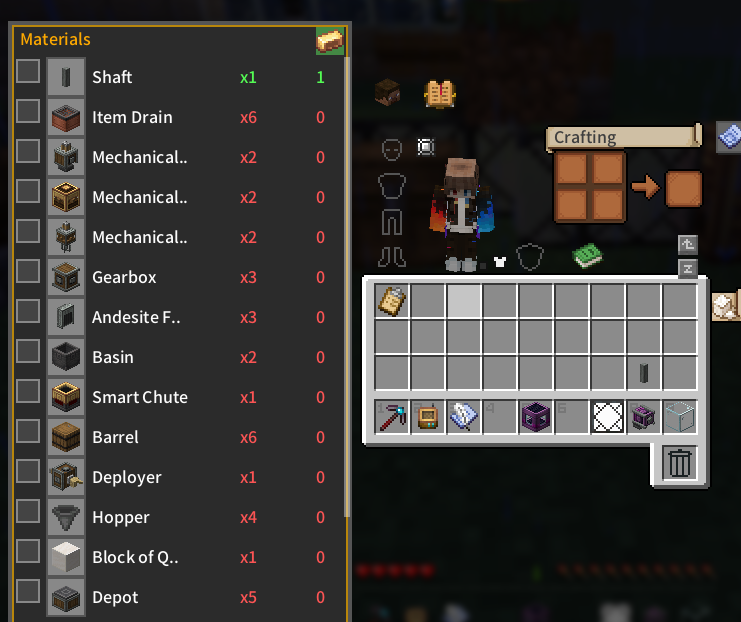
Displays a visual material list and inventory tracking for Create blueprints directly on container and inventory screens.
⬇ Download on ModrinthMod Introduction
This project includes code developed with AI assistance and manually reviewed by the author. Visual Blueprint Materials is a Create add-on that parses blueprint clipboard NBT data to display a visual material list and current inventory counts on inventory, chest, AE2, and RS terminal screens. The side panel intelligently positions itself to avoid overlapping with item slots or JEI, allowing players to track requirements, toggle collected or ignored items directly into the clipboard NBT, and lock the panel to auto-open with containers. It supports JEI recipe lookups via R/U keys and requires Minecraft 1.20.1, Forge 47.x, and Create 0.5.x or 6.x.
Authored by AlkSur under the MIT License, this project is free for personal and non-profit server use, while any commercial application, including paid modpacks or monetized servers, requires explicit written authorization.
Screenshots
- Edition: Minecraft Java
- File type: .jar
- Minecraft version listed: 1.21.1
- How to install: Install the matching mod loader (Forge, Fabric or NeoForge) for your Minecraft version. → Download the .jar. → Put it in the .minecraft/mods folder and launch that loader profile.
- Where to get it: Opens on Modrinth — not every file is mirrored on our own servers.
Install steps are the general flow for this file type — How to install Minecraft Java mods & modpacks walks through it step by step.
- Ships as create_qbp-neoforge-1.21.1-1.2.1.jar — drop this file into the mods folder
- Download size: 29 KB
- Download link checked 21 Aug 2026 — working
These come from our own check of the pack file, not from the source page.