Rival's Durability
I don't know my version or loader

Rival's Durability
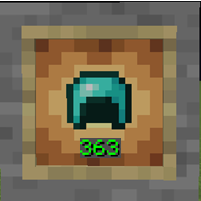
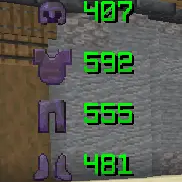
Rival's Durability is a client-side Minecraft mod that lets you view nearby players' armor durability and health directly above their heads.
You can also display your own armor durability on your HUD without opening your inventory.
Features
- See nearby players' armor durability
- See nearby players' health
- Show or hide durability numbers
- Show your own armor durability on your HUD
- Move your own durability HUD by dragging it
- Customize armor icon size, durability text size, and overlay height
- Open the settings menu with the K key
- Fully client-side
Settings
Press K in-game to open the Rival's Durability settings menu.
From the menu, you can:
- Enable or disable the mod
- Show or hide durability text
- Show or hide player health
- Show or hide your own durability HUD
- Change icon and text sizes
- Move your own HUD position
Warning
This mod may not be allowed on some servers.
Because it can show information about other players, some servers may consider it unfair or against their rules. Use it at your own risk and always check the server rules before using it.
- Edition: Minecraft Java
- File type: .jar
- Minecraft versions listed: 1.21.1, 1.21.2, 1.21.3
- How to install: Install the matching mod loader (Forge, Fabric or NeoForge) for your Minecraft version. → Download the .jar. → Put it in the .minecraft/mods folder and launch that loader profile.
- Where to get it: Opens on Modrinth — not every file is mirrored on our own servers.
Install steps are the general flow for this file type — How to install Minecraft Java mods & modpacks walks through it step by step.
- Ships as rivals-durability-1.0.0+1.21.1-1.21.5.jar — drop this file into the mods folder
- Download size: 28 KB
- Download link checked 11 Sept 2026 — working
These come from our own check of the pack file, not from the source page.