
Big Items API
Java mod listed for Minecraft 1.21. Downloads from the MC Java Mods app on Android.
⬇ Download on Modrinth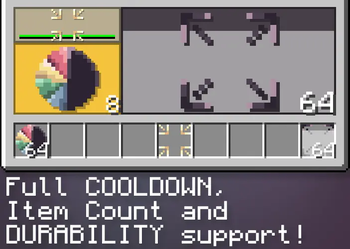
A simple to use library mod that allows mod developers to make their items take up more inventory space... for whatever reason you want to make people's lives harder
For players
Does nothing if installed not as a dependency or by itself!
For mod developers
Getting started:
- Import the .jar into your project root folder (or any folder branching from root)
- In your dependencies block in build.gradle add this line:
modImplementation(files("path/big-items-a1.2.3.jar"))
Usage:
- In an item class, implement silly.homak.bigitems.interfaces.IBigItem

IBigItem:
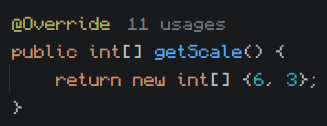
To set the item's scale override the getScale() array, has to return an array of 2 integers, this is the item's scale in slots on the X and Y axis.
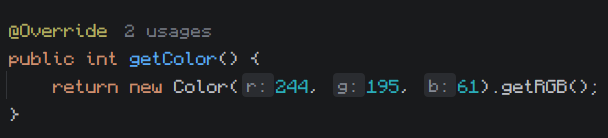
Big items have a rendered background that displays their actual scale, it's color is based on the average color of the item's texture (disregarding empty pixels). To set the background color explicitly override getColor(), has to return an integer color value.
The interface contains a boolean isScaled() that returns if the item is big or not, returns false in scenarios like being in the hotbar or a crafting block, has to be called on the client side.
Misc:
TextureUtils:
- Contains a bunch of helper methods for working with integer color values:
- darkenColor: Decreases an int color's brightness, accepts an integer color and a double factor, which has to be a decimal between 0 and 1, 1 being no effect and 0 being fully black.
- fadeColor: Decreases an int color's alpha, same arguments as the previous.
- darkenColor: Decreases an int color's saturation, same arguments as the previous.
- getAverageColor: Returns the mathematical average color of all pixels in an item's texture, disregards alpha.
- Edition: Minecraft Java
- File type: .jar
- Minecraft version listed: 1.21.1
- How to install: Install the matching mod loader (Forge, Fabric or NeoForge) for your Minecraft version. → Download the .jar. → Put it in the .minecraft/mods folder and launch that loader profile.
- Where to get it: Opens on Modrinth — not every file is mirrored on our own servers.
Install steps are the general flow for this file type — How to install Minecraft Java mods & modpacks walks through it step by step.
- Ships as big-items-a1.2.3.jar — drop this file into the mods folder
- Download size: 165 KB
- Download link checked 23 Oct 2026 — working
These come from our own check of the pack file, not from the source page.