
Goulden's Vanilla Backpack
Java mod listed for Minecraft 1.21. Downloads from the MC Java Mods app on Android.
⬇ Download on Modrinth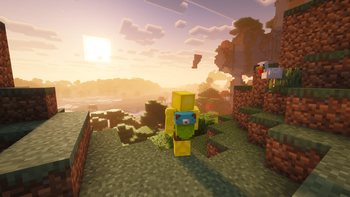


This mod adds a backpack, but not in a simple way, let me tell you why... 👀
» Craft a backpack «
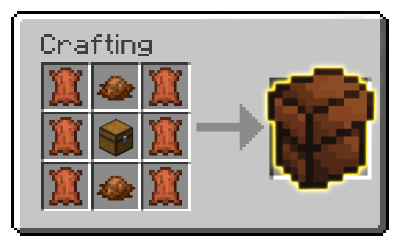
You can craft a backpack with this simple recipe.
» Equip a backpack «
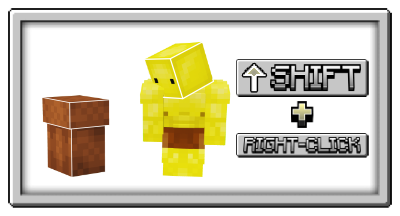

Once you crafted it, place it on the ground and Shift + Right-click it with your barehand to equip it.
To unequip it, just do the same but looking at the ground.
when equipped, it doesn't use any vanilla slot.
» Dye a backpack «
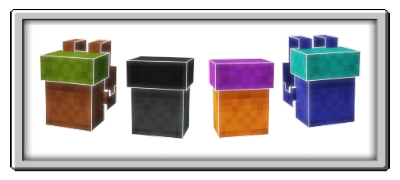
You can dye a backpack changing the dye that you craft it with or...
by Shift + Right-clicking the backpack base or lid with a dye in your hand.
it supports modded dyes
» Upgrade a backpack «
You can upgrade a backpack on 3 different ways: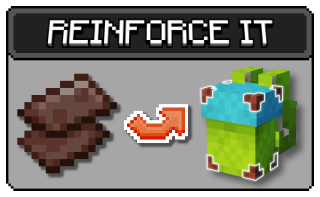
⇧makes the backpack invulnerable to lava and explosions ⇖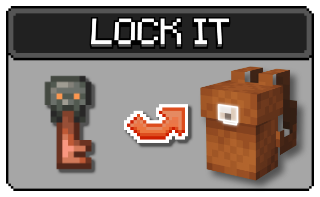
⇧locks the backpack to other players when it is in your back, removable with shears ⇖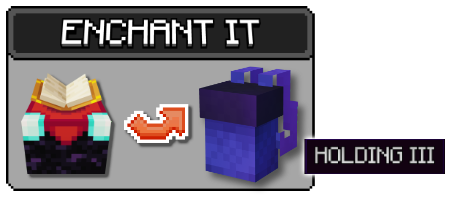
⇧increases the backpack storage capacity ⇖
- Edition: Minecraft Java
- File type: .jar
- Minecraft version listed: 1.21.1
- How to install: Install the matching mod loader (Forge, Fabric or NeoForge) for your Minecraft version. → Download the .jar. → Put it in the .minecraft/mods folder and launch that loader profile.
- Where to get it: Opens on Modrinth — not every file is mirrored on our own servers.
Install steps are the general flow for this file type — How to install Minecraft Java mods & modpacks walks through it step by step.
- Ships as gouldensvanillabackpack-neo1.21.1-1.1.jar — drop this file into the mods folder
- Download size: 223 KB
- Download link checked 21 Oct 2026 — working
These come from our own check of the pack file, not from the source page.