
Haven't I Seen This Before?
Outlines every copy of your Litematica schematics in the area loaded around you, including rotated and mirrored matches. A lightweight, client-side visual…
⬇ Download on Modrinth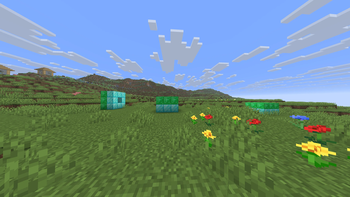
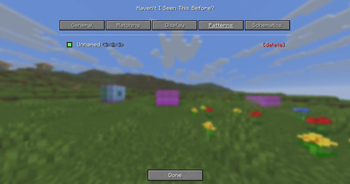
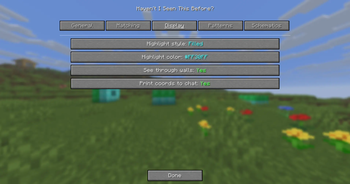
👀 Haven't I Seen This Before? (HISTB?)
Find every copy of your saved builds in the world around you — automatically.
Load one of your Litematica schematics and HISTB? outlines every place that build already exists in the area loaded around you — including rotated and mirrored copies. A lightweight, client-side companion for MaLiLib / Litematica.
Minecraft 26.1.2 · Fabric · client-side only · a visual overlay that never changes the world
⚡ TL;DR (30 seconds)
- Install HISTB?, Fabric API, and MaLiLib (drop the
.jars in yourmodsfolder). - In Litematica, save the build you want to find as a
.litematic. - In game: open Mod Menu → HISTB? → Schematics tab → click your file.
- Go to the General tab → turn it ON.
- Walk around. Your matching builds light up. ✨
That's it. No setup, no commands, no fiddling.
🎯 What it does
You point it at one of your builds (a schematic). It looks through the chunks already loaded around you and draws an outline on every copy of that build it finds — even if the copy is rotated or mirrored.
Great for:
- Locating your own builds across a big base — villager halls, iron farms, shops
- Counting how many copies of a modular build you've placed
- Keeping a large creative or survival project organized
- Re-finding a build you made ages ago and can't remember where you put it
HISTB? only ever reads the world already loaded around you — the same client-side data Litematica and MiniHUD use. It is a visual overlay: it never reads server-side data, never edits a single block, and changes nothing for anyone else.
📦 Install (step by step)
You need 3 mods. Put all of them in your .minecraft/mods folder (or your modpack's mods folder):
| Mod | Where |
|---|---|
| HISTB? (this) | Releases / Modrinth |
| Fabric API | modrinth.com/mod/fabric-api |
| MaLiLib | modrinth.com/mod/malilib |
👉 Most people also want Litematica — that's what you use to make the schematics HISTB? looks for.
Make sure every mod matches Minecraft 26.1.2.
🕹️ How to use it
Step 1 — Make a schematic (in Litematica)
Select an area around a build → save it. You now have a .litematic file in your schematics folder.
(Already have .litematic or .nbt files? Skip this step.)
Step 2 — Load it into HISTB?
Open Mod Menu → HISTB?. You'll see tabs across the top:
- Schematics → click a file to load it (it turns into a "pattern").
- Patterns → see your loaded patterns, tick/untick which ones to look for.
- General → the ON / OFF switch.
Step 3 — Turn it on
General tab → Enable. Done. It scans automatically and outlines matches live as you move.
Prefer a hotkey? Options → Controls → Haven't I Seen This Before? — bind Toggle and Open menu to whatever keys you like. (They're unbound by default so they never clash with your other mods.)
⚙️ Settings (all optional)
Everything lives in the Mod Menu tabs — no config files to edit.
- Matching — how strict a match must be, and whether to include rotated / mirrored copies.
- Display — box style (outline / filled / both), colour, line width, whether outlines draw through terrain (you can turn that off), and optional chat coordinates.
❓ Quick troubleshooting
| Problem | Fix |
|---|---|
| Nothing lights up | Is it ON (General tab)? Is a pattern ticked (Patterns tab)? Is the build actually near you? |
| Only finds nearby builds | It can only read loaded chunks — increase your render distance to search further. |
| Mod won't load | Make sure Fabric API and MaLiLib are installed, all for 26.1.2. |
| Rotated copies missed | Turn on rotations/mirror in the Matching tab. |
🌐 Multiplayer
HISTB? is a personal, client-side overlay built on the same rendering Litematica uses. It only outlines copies of the schematics you load, using chunks already loaded on your client — it sends nothing to the server and changes nothing for other players. As always, follow the rules of any server you play on.
🧠 How it works (for the curious)
It reads the blocks in your loaded area and looks for spots where they match your schematic's exact layout. To stay fast it skips chunk sections that can't possibly contain your build (the same trick Litematica uses), and it scans on a background thread so your game never stutters.
Heads up: HISTB? discovers builds by reading the world around you, so it can only outline things in loaded chunks (your render distance). Unlike Litematica's placed holograms, it can't show a match in a chunk that isn't loaded yet — there's simply no data there to read.
🙏 Credits
Made by Limucc-dev. Powered by MaLiLib (by masa). Schematics compatible with Litematica.
MIT licensed — do what you like with it.
- Edition: Minecraft Java
- File type: .jar
- Minecraft version listed: 26.2
- How to install: Install the matching mod loader (Forge, Fabric or NeoForge) for your Minecraft version. → Download the .jar. → Put it in the .minecraft/mods folder and launch that loader profile.
- Where to get it: Opens on Modrinth — not every file is mirrored on our own servers.
Install steps are the general flow for this file type — How to install Minecraft Java mods & modpacks walks through it step by step.
- Ships as histb-1.1.0.jar — drop this file into the mods folder
- Download size: 76 KB
- Download link checked 14 Sept 2026 — working
These come from our own check of the pack file, not from the source page.