
Discord Emotes
Type Discord shortcodes like :skull: or :fire: in chat and watch them turn into inline emoji, just like Discord. Includes 78 Twemoji emotes rendered at…
⬇ Download on Modrinth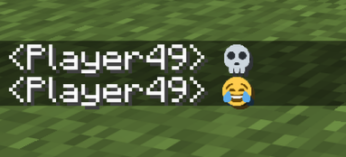
Type Discord-style shortcodes like :skull:, :fire:, or :100: straight into chat and watch them turn into real inline emoji, exactly the way they look in Discord. It ships with 78 hand-picked emotes from the same Twemoji set Discord uses, each rendered crisp and sized to sit neatly inline with your text. Everything is fully client-side, so it only changes how chat looks on your own screen — it works on any server, vanilla ones included, and nobody else you're playing with needs to install a thing. There's nothing to set up or configure either: just drop it in and start spamming emotes.
- Edition: Minecraft Java
- File type: .jar
- Minecraft versions listed: 26.1, 26.1.1, 26.1.2
- How to install: Install the matching mod loader (Forge, Fabric or NeoForge) for your Minecraft version. → Download the .jar. → Put it in the .minecraft/mods folder and launch that loader profile.
- Where to get it: Opens on Modrinth — not every file is mirrored on our own servers.
Install steps are the general flow for this file type — How to install Minecraft Java mods & modpacks walks through it step by step.
- Ships as discord-emotes-1.0.0.jar — drop this file into the mods folder
- Download size: 89 KB
- Download link checked 11 Sept 2026 — working
These come from our own check of the pack file, not from the source page.