
Where did I get this?
I don't know my version or loader
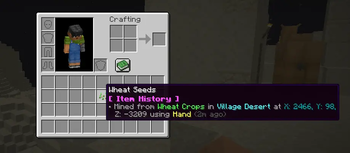
Where Did I Get This? adds a history line to your item tooltips that displays the exact coordinates, structure, and method of how you found or obtained your items.
Unique Item History: Every single item keeps its own distinct history.
Detailed Origins: Displays the exact structures your items came from (like Trial Chambers, Ancient Cities, or Spawner Dungeons), alongside mob drops, crafting, and mined block coordinates.
Singleplayer Only: This mod does not work on multiplayer servers.(Might work if added to the actual MultiPlayer Server Files)
Tiktok: @zouheir0codes Instagram: @Zouheir012 Youtube: @Zouheir0
- Edition: Minecraft Java
- File type: .jar
- Minecraft versions listed: 1.21.5, 1.21.6, 1.21.7
- How to install: Install the matching mod loader (Forge, Fabric or NeoForge) for your Minecraft version. → Download the .jar. → Put it in the .minecraft/mods folder and launch that loader profile.
- Where to get it: Opens on Modrinth — not every file is mirrored on our own servers.
Install steps are the general flow for this file type — How to install Minecraft Java mods & modpacks walks through it step by step.
- Ships as Where-did-i-get-this-1.25+.jar — drop this file into the mods folder
- Download size: 77 KB
- Download link checked 10 Sept 2026 — working
These come from our own check of the pack file, not from the source page.