
Advancement Bingo
I don't know my version or loader
Bingo
A simple game of advancement bingo.

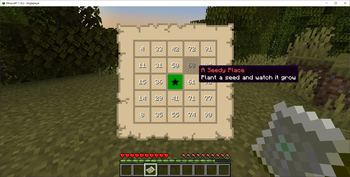
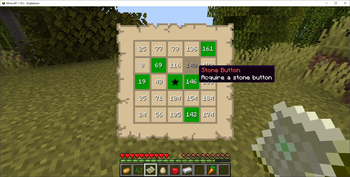
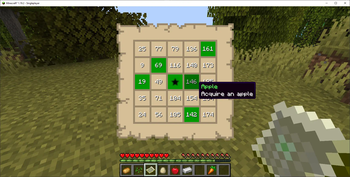
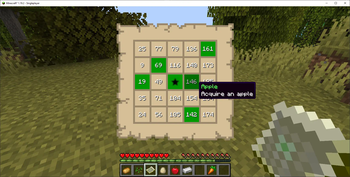
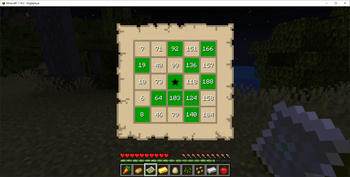
A user can start a game of advancement bingo for players in the session. This simple to install, fully customizable game works in virtually any vanilla world, custom world, or modpack world with both vanilla advancements and/or custom advancements. Options for various game rules and card generation can be changed in the start screen. Advancements are numbered starting from one and generated boards have a proper bingo number spread among all rows and columns.
FAQs
How to Play
Start the game!
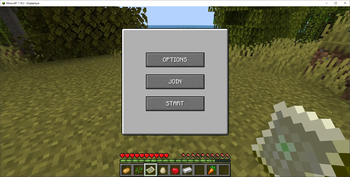
- Open the Bingo Game Screen using the
'b'key to choose game options - When players are ready, a player can use the Game Screen to start a game of advancement bingo
- A player can also type the
\bingo startcommand to start the game of advancement bingo - A game can be cancelled for all players at any time using the
\bingo stopcommand - The game status can be viewed at any time using the
\bingo startedcommand - Bingo cards can be viewed using the
'o'key or right-clicking a bingo card item - Bingo cards can only be viewed after the game has started
- Player advancement progress is cleared when the game is started
- Player inventory is cleared when the game is started
- Player inventory can be return to the player after a game has ended using the
\bingo return itemscommand
WARNING: This mod will reset your advancement progress.
Game Mode
Use the Bingo Game Screen using the 'b' key
- Bingo (standard bingo)
- Blackout (all squares bingo)
- Twenty (20 squares or best, no bingo)
Game Rules
Use the Bingo Game Screen using the 'b' key
Unlock Options
- Include/exclude recipe unlocks in the game to complete squares
- Include/exclude advancement unlocks in the game to complete squares
Recipe Options
- Include/exclude vanilla recipes (all recipes with id of "minecraft")
- Include/exclude modded recipes (all recipes without id of "minecraft")
- Include/exclude custom recipes (all recipes with id provided by user)
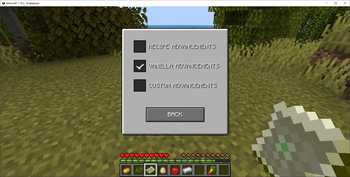
Advancement Options
- Include/exclude vanilla advancements (all advancements with id of "minecraft")
- Include/exclude modded advancements (all advancements without id of "minecraft")
- Include/exclude custom advancements (all advancements with id provided by user)
Card Options
- Personal - All players have individual randomized cards
- Team - All players on the same team have the same randomized card
- Global - All players have the same randomized card
Progress Options
- Personal - Squares unlock for each individual player
- Team - Squares unlock for each player on the same team (except neutral)
- Global - Squares unlock for all players in the session
- Loot Generation - Loot is Generated for square and game completion using the bingo loot table
NOTE: Edit the bingo loot table to customize loot drops.
Red vs. Blue Team Play
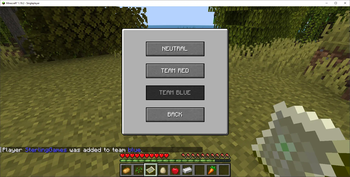
- A player can type the
\bingo join red|blueto join the red or blue team - A player can type the
\bingo add -player- red|bluecommand to add another player to the red or blue team - When a player types the
\bingo playerscommand each player name is displayed in their team color if any - A player cannot switch teams once a game has started
Key Bindings
The default keys for the bingo game can changed in the Minecraft Menu for Key Binds
- View Bingo Card:
'o' - View Game Screen:
'b'
Loot Generation
Game Screen option for Loot Generation on the Progress page using the 'b' key
-OR-
- A player can type the
\bingo toggle lootcommand to toggle loot generation on or off - A player with op privileges can toggle loot generation after the game has started
Custom Loot Tables
Just download the BingoLoot datapack and drop the zip file into your world save's datapacks folder to generate random loot during the game. You can customize the given loot by extracting the datapack files and editing the square.json and winner.json files according to standard loot table specifications.
- BingoLoot/data/bingo/loot_tables/square.json
- BingoLoot/data/bingo/loot_tables/winner.json
Download Bingo Loot Tables here
NOTE: Edit the bingo loot tables to customize loot drops.
Advancement Datapacks
Just drop any or all collectables datapacks into your world save's datapacks folder and enable modded advancements to enable all modded and custom advancements. You can customize the given collectables by editing the json files according to standard advancement specifications or create your own! Most modpacks already come with custom advancements loaded and needs no adjustment to start a game of bingo, just add the mod to the mods folder of the modpack and play! If you want to restrict the advancements or recipes to a particular mod in your modpack, choose the custom option and supply the modid of the desired mod.
New Survival or Peaceful datapacks!
Download Peaceful Easy collectables datapack here (100+ items!)
Download Peaceful Medium collectables datapack here (100+ items!)
Download Survival Easy collectables datapack here (100+ items!)
Download Survival Medium collectables datapack here (100+ items!)
Download Survival Hard collectables datapack here (100+ items!)
NOTE: Edit the bingo collectibles to customize square unlocks or create your own!
Language Support
- English version (standard)
- French version (new)
Find an error? Missing language? Create your own language file! Download Official Language Specification: en_us.json Download All Languages: language_pack.zip
Just drop the language datapacks zip file into your datapacks folder!
NOTE: English and French language files are installed by default already.
Minecraft Game Commands
bingo startstarts the game for all active playersbingo restartrestarts the game for all active playersbingo stopcancels any game in progressbingo resetsame asbingo stopto cancel a game in progressbingo add -player- red|blueadds the player to the list of active team playersbingo playerslists all active players in the sessionbingo join red|blueadds the player to the list of active team playersbingo quit teamleaves the current team and joins the neutral teambingo toggle loottoggles game loot generation on or offbingo return itemsreturns the player's items when a game is not in progress
Comments
Feel free to leave a comment and submit an issue ticket if something goes wrong. We're working hard to get this mod into an official release state! Thanks! Submit an Issue
- Edition: Minecraft Java
- File type: .jar
- Minecraft versions listed: 1.20.1, 1.20.2, 1.20.3
- How to install: Install the matching mod loader (Forge, Fabric or NeoForge) for your Minecraft version. → Download the .jar. → Put it in the .minecraft/mods folder and launch that loader profile.
- Where to get it: Opens on Modrinth — not every file is mirrored on our own servers.
Install steps are the general flow for this file type — How to install Minecraft Java mods & modpacks walks through it step by step.
- Ships as bingo-0.2.0-fabric-1.20.1.jar — drop this file into the mods folder
- Download size: 335 KB
- Download link checked 13 Sept 2026 — working
These come from our own check of the pack file, not from the source page.