
M0-Dev Tools
M0-Dev Tools is a client-side Fabric toolbox for Minecraft modders, builders, and technical players. It bundles overlays, HUDs, movement helpers, macros, scripting, and debugging tools into one mod.
Certain modules such as X-Ray, Freecam will require the mod to be installed on the server as well.
It was meant to be a personal project, but I decided to release it for public.
Feature overview
Visual overlays & inspectors
- Light level overlay - Shows light levels on blocks to help with mob spawning prevention
- Redstone power overlay - Visualizes redstone power levels and updates
- Redstone dust update order / BUD overlay - Shows the order of redstone dust updates and BUD mechanics
- Slime chunk overlay - Highlights slime chunks for easy location identification
- Biome border overlay - Displays biome boundaries
- Chunk border overlay - Shows chunk borders for navigation and building
- Structure bounding box overlay - Visualizes structure bounding boxes
- Command block overlay - Shows command block information and commands
- Block inspector / WAILA-style block text - Displays detailed block information on hover
- NBT info HUD - Shows NBT data as an on-screen overlay/HUD
- NBT tooltips - Displays NBT information in item tooltips
- Shulker preview tooltips - Preview shulker contents on hover
- Entity radar / entity list - Shows nearby entities with distance and information
- Entity health bars - Displays health bars above entities
- Item pickup notifier - Announces when items are picked up
- Mob drops tracker - Tracks and displays mob drops with statistics (kills, items per minute, unique items)
- Mob AI visualizer - Shows mob AI goals and behaviors currently active
- ClickHUD - Interactive HUD for quick access to modules
Building, movement & utility tools
- Xray - Shows specified blocks through walls and terrain
- Instant break - Breaks blocks instantly without mining animation
- Fast block placement - Places blocks at maximum speed
- Reach - Extends player reach distance for blocks and entities
- Inventory move - Allows moving items in inventory while holding items
- Mouse Tweaks support - Integration with Mouse Tweaks mod for enhanced mouse controls
- Bridging tweaks - Assists with bridge building (snapping, torch placement, slab assist, replaceable targets)
- Fullbright - Illuminates dark areas for better visibility
- Held light - Provides light from held items
- Zoom - Zooms in for better precision and long-distance viewing
- Freecam - Move camera independently of player body
- Quick teleport - Quick teleportation to waypoints and locations
- Waypoints - Place and manage waypoints for navigation
- Hunger tweaks - Modifies hunger-related behavior (saturation preservation, no-sprint on low hunger, etc.)
- Dynamic FPS - Adjusts frame rate based on window focus for performance
- HUD tweaks - Customize HUD elements visibility and appearance
- WorldEdit - Basic WorldEdit integration with
/drawcompanion command
Chat & workflow helpers
- Secondary chat - Advanced chat system with:
- Addon/replacement render modes for vanilla chat
- Draggable multi-window custom chat
- Tab organization with per-tab regex routing
- Unread message indicators
- Timestamps
- Compact repeated message display
- Message selection and interaction features
- Customizable window management
- Command history - Browse and execute previously used commands
- Message history - Access and search message history
- Longer chat history - Extended chat message retention
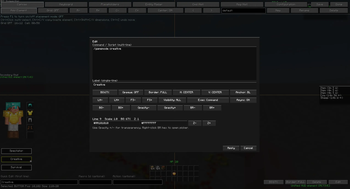
- Better command block UI - Enhanced command block editor interface
- UI utilities - Advanced screen utilities:
- Packet send/delay functionality
- Save/restore GUI state
- De-sync screens
- Close windows without sending packets
- Copy GUI title JSON
- In-GUI command/message input field
Macros, scripting & automation
- Macro manager - Create and manage macros with keybind workflows
- Macro workbench canvas - Visual editor for macro creation
- Macro workbench keyboard layout - Configure keyboard layouts for macro execution
- Macro placeholders - Use dynamic placeholders in macros with provider extension points
- Script execution - Support for multiple scripting languages:
- Groovy (
.groovy) - Kotlin (
.kts) - JavaScript (
.js)
- Groovy (
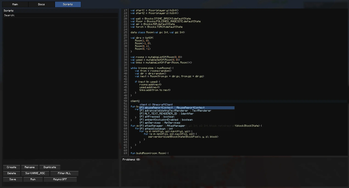
- In-game script editor - Edit and test scripts directly in-game
- Rule-based automation engine - Advanced automation with
/automationcommand for:- Event-based triggers
- Conditional actions
- Module toggling
- Action runner - Execute queued client actions:
- Item use, offhand use, left click
- Sneak, jump, drop
- Command execution
- Offhand swapping
- Hotbar slot selection
- Customizable delays between actions
Debugging & admin tools
/drawshape/debug rendering - Draw custom shapes for debugging:- Lines, boxes, circles, cylinders, spheres
- Selection outlines
- Saved shapes with persistence
- Shape management (list, remove, clear)
- Save/load shape collections
- Interactive shape UI
/getdatablock/entity inspector - Inspect and edit:- Block NBT data and properties
- Entity NBT data and attributes
- Item components and data
- Real-time data editing
- Data browser interface
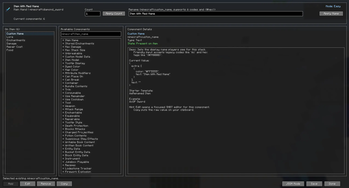
/itemdataitem component inspector - Advanced item component inspection and editing with:- Component metadata and descriptions
- Type hints and validators
- Component examples and templates
- Visual component editor
- Watson/CoreProtect tracker - Visualize CoreProtect data with:
- Watson-style visualization
- Tracer rendering
- Vector visualization
- TTL controls for data fade
- Synthetic test data for testing
- Teleport helpers for investigating edits
- Entry search and filtering
Tweaks module
Customizable behavior modifications:
- Particle tweaks - Hide own effect particles
- Rendering tweaks - Hide offhand item, disable block breaking particles, hide entity rendering
- Environmental tweaks - Disable Nether fog, disable rain effects
- Audio tweaks - Disable sounds
- Movement tweaks - Disable wall-unsprint behavior, angel block placement
- Permanent toggles - Permanent sneak and sprint
- Camera tweaks - Disable hurt camera shake, disable view bobbing
- Performance tweaks - Disable render distance fog
Block & Building utilities
- Block scanner - Scan for specific blocks with customizable search patterns
- Convenience commands - Utility commands for common tasks
- Math evaluator - Execute mathematical expressions with
/mathcommand
Scripting
Open the scripting module with , (default) keybind.
Groovy: give yourself a diamond sword
import net.minecraft.item.Items
import net.minecraft.item.ItemStack

player.giveItemStack(new ItemStack(Items.DIAMOND_SWORD))

"Gave you a diamond sword!"
Kotlin: spawn particles around the player
import net.minecraft.particle.ParticleTypes
import kotlin.math.cos
import kotlin.math.sin

val particleManager = client.particleManager

for (i in 0 until 20) {
    val angle = Math.toRadians(i * (360.0 / 20))
    val x = player.x + cos(angle) * 1.5
    val y = player.y + 1.0
    val z = player.z + sin(angle) * 1.5

    particleManager.addParticle(
        ParticleTypes.HAPPY_VILLAGER,
        x, y, z,
        0.0, 0.1, 0.0
    )
}

"Spawned"
Quick facts
- Edition: Minecraft Java
- File type: .jar
- Minecraft version listed: 1.21.11
- How to install: Install the matching mod loader (Forge, Fabric or NeoForge) for your Minecraft version. → Download the .jar. → Put it in the .minecraft/mods folder and launch that loader profile.
- Where to get it: Opens on Modrinth — not every file is mirrored on our own servers.
Install steps are the general flow for this file type — How to install Minecraft Java mods & modpacks walks through it step by step.
Verified by MCModsHub
- Ships as M0-DevTools-j21-mc1.21.11-1.3.0-BETA.jar — drop this file into the mods folder
- Download size: 62.2 MB
- Download link checked 13 Sept 2026 — working
These come from our own check of the pack file, not from the source page.