
Incognito Chat
Incognito Chat is a client-side Minecraft mod that adds private encrypted chat, custom groups, and secure communication between players.
I don't know my version or loader
Incognito Chat
Private encrypted communication for Minecraft.
Incognito Chat is a client-side Minecraft mod that adds private encrypted communication between players. Create your own groups, use unique encryption codes, and securely chat with your friends directly in-game.
Features
- Private encrypted chat
- 3 separate group slots
- Unique encryption code for each group
- Fast group switching
- Player invitation system
- Custom text colors
- Customizable menu keybind
- Client-side mod
How It Works
Each group uses its own encryption code that you choose.
Players with the same code and selected group can read encrypted messages.
Usage
After installing the mod:
- Join any world or server
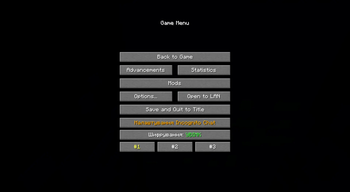
- Open the ESC menu
You will see new buttons:
#1, #2, #3
Quickly switch between groups.
Enable/Disable Encrypting
Enable or disable encryption.
Incognito Settings
Main settings menu of the mod.
Inside the settings menu you can:
- switch between groups;
- change your encryption code;
- invite players;
- change your text color.
Hotkey
By default, Incognito Settings can be opened with the N key.
You can change the keybind here:
Controls → Multiplayer → Open Incognito Settings
- Edition: Minecraft Java
- File type: .jar
- Minecraft versions listed: 1.21.1, 1.21.2, 1.21.3
- How to install: Install the matching mod loader (Forge, Fabric or NeoForge) for your Minecraft version. → Download the .jar. → Put it in the .minecraft/mods folder and launch that loader profile.
- Where to get it: Opens on Modrinth — not every file is mirrored on our own servers.
Install steps are the general flow for this file type — How to install Minecraft Java mods & modpacks walks through it step by step.
- Ships as Incognito-Chat-1.0.0.jar — drop this file into the mods folder
- Download size: 1.3 MB
- Download link checked 22 Aug 2026 — working
These come from our own check of the pack file, not from the source page.