
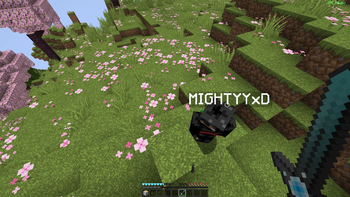
PE Controls is a client-side Fabric mod that makes Java Edition controls feel closer to classic Minecraft PE/Bedrock touch-style aiming.
Instead of always targeting the center crosshair, PE Controls lets you use a free cursor to point at blocks and entities anywhere on the screen. It is designed for players who prefer cursor-based block interaction while keeping normal Java movement.
Features Free PE-style cursor while the mod is enabled Off-center block breaking and interaction Survival block breaking with left-click hold Single right-click to place blocks, open chests, and interact Hold right-click and drag to rotate the camera PE-style cursor dot and block-breaking progress ring One simple keybind to toggle the mod on and off Client-side only Controls P: Toggle PE Controls on/off Left click: Break the block under the cursor Hold left click: Continue breaking blocks in survival Right click: Use, place, or interact with the target under the cursor Hold right click and drag: Move the view WASD, jump, sneak, scroll wheel: unchanged from vanilla Requirements Minecraft 1.20.1 Fabric Loader 0.15.7 or newer Fabric API Notes This mod changes client-side camera and hit-target behavior. It is intended for normal gameplay, building, and PE-style control preference. Server-side installation is not required.
- Edition: Minecraft Java
- File type: .jar
- Minecraft versions listed: 1.20.1, 1.20.2, 1.20.3
- How to install: Install the matching mod loader (Forge, Fabric or NeoForge) for your Minecraft version. → Download the .jar. → Put it in the .minecraft/mods folder and launch that loader profile.
- Where to get it: Opens on Modrinth — not every file is mirrored on our own servers.
Install steps are the general flow for this file type — How to install Minecraft Java mods & modpacks walks through it step by step.
- Ships as pe-controls-1.0.2.jar — drop this file into the mods folder
- Download size: 19 KB
- Download link checked 24 Aug 2026 — working
These come from our own check of the pack file, not from the source page.