
Low Latency
Java mod listed for Minecraft 26.x. Downloads from the MC Java Mods app on Android.
⬇ Download on Modrinth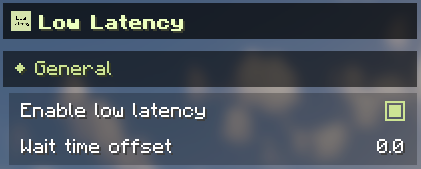
Low Latency
This mod is designed to reduce input latency when the GPU is full load and the CPU is not, inspired by NVIDIA Reflex.
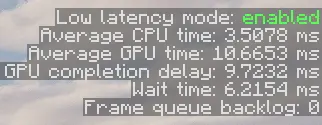
When the gpu is full load and the CPU is not, a frame queue backlog will build up, the input latency will increase.
This mod estimates input latency based on historical CPU and GPU frame times, and waits before input events to ensure the frame queue will not build up, which reduces input latency.
This project is in its early stages, which may result in reduced frame rates or increased latency. You can adjust the ‘wait time offset’ in the config menu to alleviate this issue.
You can enable/disable low latency feature in config menu.
Config menu

F3 debug screen

- Edition: Minecraft Java
- File type: .jar
- Minecraft version listed: 26.2
- How to install: Install the matching mod loader (Forge, Fabric or NeoForge) for your Minecraft version. → Download the .jar. → Put it in the .minecraft/mods folder and launch that loader profile.
- Where to get it: Opens on Modrinth — not every file is mirrored on our own servers.
Install steps are the general flow for this file type — How to install Minecraft Java mods & modpacks walks through it step by step.
- Ships as low_latency-neoforge-26.2-1.1.0-alpha.1.jar — drop this file into the mods folder
- Download size: 29 KB
- Download link checked 18 Oct 2026 — working
These come from our own check of the pack file, not from the source page.