
Maikura Inventory Expansion
Adds configurable extra inventory space directly to the vanilla inventory screen.
Features
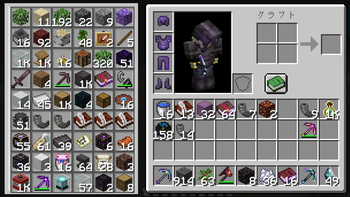
- Adds extra inventory slots to the player inventory
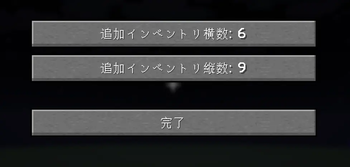
- Configurable from 3×3 to 6×9 extra slots
- Integrated directly into the vanilla inventory GUI
- Per-player inventory storage
- Death-safe storage
- Mod Menu configuration support
- Items stored in hidden slots are not deleted when inventory size is reduced
Configuration
The extra inventory size can be customized from:
- Width: 3 to 6 slots
- Height: 3 to 9 slots
This allows inventory sizes ranging from 3×3 (9 slots) up to 6×9 (54 slots).
Requirements
- Fabric Loader
- Fabric API
- Mod Menu (optional)
Notes
When the inventory size is reduced, items stored outside the visible range are hidden but remain safely stored. Expanding the inventory again will make those items visible.
Inventory data is stored per player and remains available after rejoining the world.
Quick facts
- Edition: Minecraft Java
- File type: .jar
- Minecraft version listed: 1.21.11
- How to install: Install the matching mod loader (Forge, Fabric or NeoForge) for your Minecraft version. → Download the .jar. → Put it in the .minecraft/mods folder and launch that loader profile.
- Where to get it: Opens on Modrinth — not every file is mirrored on our own servers.
Install steps are the general flow for this file type — How to install Minecraft Java mods & modpacks walks through it step by step.
Verified by MCModsHub
- Ships as maikura-inventory-expansion-fabric-mc1.21.11-v0.1.1.jar — drop this file into the mods folder
- Download size: 41 KB
- Download link checked 22 Aug 2026 — working
These come from our own check of the pack file, not from the source page.