
GearHud
Java mod listed for Minecraft 1.21. Downloads from the MC Java Mods app on Android.
Compact HUD showing the durability of your armor, main hand, and off hand as color-coded bars so a tool or armor piece never breaks by surprise.
⬇ Download on Modrinth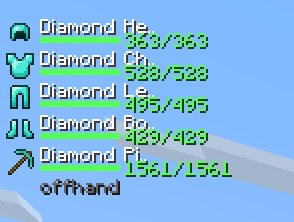
GearHud
GearHud puts a small, clean durability readout next to your hotbar so you always know how much life your gear has left - no more accidentally breaking an enchanted tool or losing an armor piece mid-fight.
Features
- Durability bars for all four armor pieces, your main hand, and your off hand
- Color-coded from green to yellow to red as items wear down
- Low-durability emphasis so near-broken items stand out at a glance
- Optional numeric or percentage readout
- Fully configurable position, layout (horizontal/vertical), and scale
How to use
Equip armor and tools and the HUD appears automatically. Open the settings (ModMenu ? GearHud) to reposition it or change what's shown.
Requirements
- Fabric API
- Yet Another Config Lib (YACL)
Client-side only - safe on any server.
- Edition: Minecraft Java
- File type: .jar
- Minecraft version listed: 1.21.10
- How to install: Install the matching mod loader (Forge, Fabric or NeoForge) for your Minecraft version. → Download the .jar. → Put it in the .minecraft/mods folder and launch that loader profile.
- Where to get it: Opens on Modrinth — not every file is mirrored on our own servers.
Install steps are the general flow for this file type — How to install Minecraft Java mods & modpacks walks through it step by step.
- Ships as GearHud-1.0.0.jar — drop this file into the mods folder
- Download size: 9 KB
- Download link checked 4 Oct 2026 — working
These come from our own check of the pack file, not from the source page.