
REQUIREMENTS NightVisuals GUI
EN:
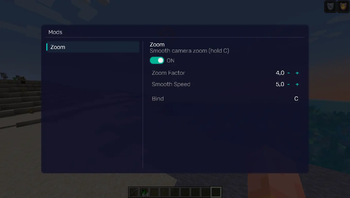
NightVisuals Zoom is a modification that adds a customizable zoom feature to the game. The mod is optimized for improved viewing convenience and offers flexible configuration options tailored to individual player preferences.
Core Features
Hold-to-Activate: Zoom only works while the assigned key is held down. Upon releasing the button, the camera instantly returns to its default state.
Keybinding: Full integration with the game's standard controls menu. You can assign any convenient key or mouse button to activate the zoom.
Zoom Factor (Magnification Level): A slider to adjust the zoom strength. Allows you to set anything from a slight magnification for better overview to a strong zoom for detailed inspection of distant objects.
Zoom Speed: Transition dynamics adjustment. Change the animation time for zooming in and out — from an instant snap to a smooth transition.
Configuration
All parameters can be changed through the configuration file or the in-game settings menu:
Key Assignment: Go to control settings, find the NightVisuals category, and assign your key.
Zoom Factor: Set the magnification coefficient (e.g., from 2.0 to 10.0).
Zoom Speed: Adjust the smoothness value to achieve a comfortable visual effect.
Installation
- Install a compatible version of the mod loader (Fabric API).
- Place the downloaded mod file into the mods folder.
- Launch the game.
RU:
NightVisuals Zoom — это модификация, добавляющая в игру настраиваемую функцию масштабирования (зума). Мод оптимизирован для повышения удобства обзора и предлагает гибкие параметры конфигурации под индивидуальные предпочтения игрока.
Основной функционал
Активация по зажатию: Масштабирование работает исключительно во время удержания назначенной клавиши. При отпускании кнопки камера мгновенно возвращается в исходное состояние.
Привязка клавиш: Полная интеграция в стандартное меню управления игры. Вы можете назначить любую удобную клавишу или кнопку мыши для активации зума.
Zoom Factor (Кратность приближения): Ползунок регулировки силы масштабирования. Позволяет настроить как незначительное приближение для улучшения обзора, так и сильное увеличение для детального осмотра удаленных объектов.
Скорость зума: Настройка динамики перехода. Доступно изменение времени анимации приближения и отдаления — от мгновенной смены кадра до плавного перехода.
Настройка
Все параметры изменяются через конфигурационный файл или внутриигровое меню настроек:
Назначение кнопки: Перейдите в настройки управления, найдите категорию NightVisuals и укажите клавишу.
Zoom Factor: Установите коэффициент кратности (например, от 2.0 до 10.0).
Скорость зума: Отрегулируйте значение плавности для достижения комфортного визуального эффекта.
Установка
- Установите совместимую версию загрузчика модов (Fabric API).
- Поместите скачанный файл модификации в папку mods.
- Запустите игру.
- Edition: Minecraft Java
- File type: .jar
- Minecraft version listed: 1.21.4
- How to install: Install the matching mod loader (Forge, Fabric or NeoForge) for your Minecraft version. → Download the .jar. → Put it in the .minecraft/mods folder and launch that loader profile.
- Where to get it: Opens on Modrinth — not every file is mirrored on our own servers.
Install steps are the general flow for this file type — How to install Minecraft Java mods & modpacks walks through it step by step.
- Ships as nightvisuals-zoom-1.0.1.jar — drop this file into the mods folder
- Download size: 8 KB
- Download link checked 14 Sept 2026 — working
These come from our own check of the pack file, not from the source page.