
No Fog – Clear View
Java resource pack listed for Minecraft 26.x. Downloads from the MC Java Mods app on Android.
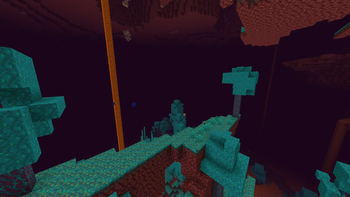
Removes fog in the Overworld, Nether and End for a clear, long-distance view — spot structures, biomes and players from far away, with an FPS boost…
I don't know my version or loader
No Fog
See the whole world. No Fog removes the fog in every dimension (Overworld, Nether and End) so you can spot structures, biomes, mobs and players from far away — with a nice FPS boost.
What it does
- Removes distance fog in all dimensions
- Changes no blocks, items or gameplay
- Often improves FPS
- Works client-side, single-player and servers
- No mods, OptiFine, or Sodium
Compatibility
The universal release supports the Minecraft versions listed on this page, including the latest releases, and works in vanilla alongside Sodium or OptiFine.
Installation
- Download the latest release.
- Go to Options -> Resource Packs.
- Open Pack Folder, drop in the ZIP.
- Enable it. Do not unzip.
FAQ
Does it work underwater and in the Nether? Yes — fog is removed in all dimensions.
- Edition: Minecraft Java
- File type: .zip (resource pack)
- Minecraft versions listed: 26.1, 26.1.1, 26.1.2
- How to install: Download the .zip resource pack — do not unzip it. → Put it in .minecraft/resourcepacks. → Enable it in Options → Resource Packs.
- Where to get it: Opens on Modrinth — not every file is mirrored on our own servers.
Install steps are the general flow for this file type — How to install Minecraft Java resource packs walks through it step by step.
- Downloads as No-Fog-26.1-26.2.zip
- Download size: 11 KB
- Download link checked 25 Oct 2026 — working
These come from our own check of the pack file, not from the source page.