
odventure-core
Java mod listed for Minecraft 1.20. Downloads from the MC Java Mods app on Android.
Display blocks for Minecraft: mount trophies and medals showing any block, item, or mob, with custom names. Retrievable as data-carrying items, with an…
⬇ Download on Modrinth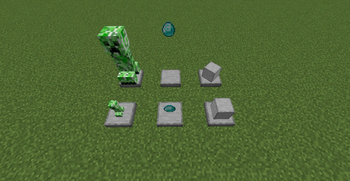
Odventure Core
A Minecraft mod that adds two kinds of display blocks: the Trophy Base and the Medal. Put a block, item, or spawn egg (Trophy) or an item (Medal) on display and give it a custom name. Finished displays can be retrieved as items; their data is saved on the item and restored when placed again.
- Platform: Minecraft 1.20.1 / Forge 47.x
- Mod ID:
odventure_core - Author: liluo23
Features
Trophy Base
- A short smooth-stone pedestal that faces the player when placed.
- Right-click with a block, item, or spawn egg to display it:
- Block -> the block is rendered above the pedestal
- Item -> the item is rendered as a 3D model
- Spawn egg -> the adult form of the entity is rendered, auto-scaled to a uniform size
- Once content is set, the pedestal becomes a full-cube collision.
- In creative mode, the display scale, rotation, and height offset can be adjusted.
Medal
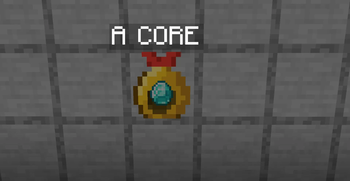
- A wall-mounted medal that attaches to the clicked face.
- Can be mounted on full blocks, all kinds of glass, and glowstone. Slabs, stairs, fences, walls, flower pots and other partial blocks are rejected.
- Drops automatically when its supporting block is removed.
- Right-click with an item to embed it; the item is shown in the center of the medal.
Shared interaction
- Content and name lock independently. Setting content locks the content; naming locks the name.
- Sneak right-click or break the block to retrieve the finished item. The item carries its data and restores the display (and lock state) when placed again.
- When looked at, a floating name tag is shown above the block. The
§color codes are supported. - Hovering the item shows the custom name and the displayed content name.
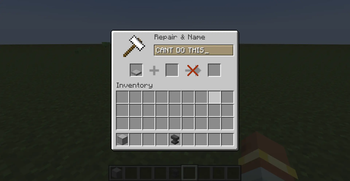
- Anvils cannot rename the finished items. Names are set only through the in-game naming screen.
How to use
- Take an empty Trophy Base or empty Medal from the "Odventure" creative tab.
- Place it in the world.
- Right-click with the content to display; the content locks immediately.
- Empty-hand right-click to open the naming screen, enter a name and confirm; the name locks.
- Sneak right-click or break to retrieve the finished item; place it again to restore.
Drops
Drops are handled in code (the block returns the data-carrying item directly), so the mod does not ship a loot table. Breaking a display always yields the finished item with its data intact.
If you prefer a data-pack-driven loot table instead, you can override it. The block entity stores its fields at the top level, so a copy_nbt function can copy them into BlockEntityTag. Example for the trophy:
{
  "type": "minecraft:block",
  "pools": [
    {
      "rolls": 1,
      "entries": [
        {
          "type": "minecraft:item",
          "name": "odventure_core:trophy_base",
          "functions": [
            {
              "function": "minecraft:copy_nbt",
              "source": "block_entity",
              "ops": [
                { "source": "ContentType",   "target": "BlockEntityTag.ContentType",   "op": "replace" },
                { "source": "ContentId",     "target": "BlockEntityTag.ContentId",     "op": "replace" },
                { "source": "CustomName",    "target": "BlockEntityTag.CustomName",    "op": "replace" },
                { "source": "ContentLocked", "target": "BlockEntityTag.ContentLocked", "op": "replace" },
                { "source": "NameLocked",    "target": "BlockEntityTag.NameLocked",    "op": "replace" },
                { "source": "DisplayScale",  "target": "BlockEntityTag.DisplayScale",  "op": "replace" },
                { "source": "DisplayYaw",    "target": "BlockEntityTag.DisplayYaw",    "op": "replace" },
                { "source": "DisplayY",      "target": "BlockEntityTag.DisplayY",      "op": "replace" }
              ]
            }
          ]
        }
      ]
    }
  ]
}
Note: to use the loot table you must remove the getDrops override in the block, otherwise the code path takes priority.
Giving finished items (commands)
A finished item is just an item with data under BlockEntityTag. You can hand it out with /give.
Trophy displaying a diamond, named with a gold color code:
/give @p odventure_core:trophy_base{BlockEntityTag:{ContentType:"ITEM",ContentId:"minecraft:diamond",ContentLocked:1b,CustomName:"§6Champion Trophy",NameLocked:1b,DisplayScale:1.0f,DisplayYaw:0.0f,DisplayY:0.0f}}
Trophy displaying a creeper (entity), scaled down a bit:
/give @p odventure_core:trophy_base{BlockEntityTag:{ContentType:"ENTITY",ContentId:"minecraft:creeper",ContentLocked:1b,CustomName:"§aBoss Slayer",NameLocked:1b,DisplayScale:0.8f,DisplayYaw:0.0f,DisplayY:0.0f}}
Medal embedding a nether star:
/give @p odventure_core:medal{BlockEntityTag:{EmbeddedItem:{id:"minecraft:nether_star",Count:1b},ContentLocked:1b,CustomName:"§bGreatest Hero",NameLocked:1b}}
FTB Quests rewards
The mod is compatible with FTB Quests item rewards out of the box, because all data lives in standard item NBT (BlockEntityTag), which the quest reward serializer preserves.
Two ways to set it up:
- In-game capture: obtain the finished item (craft, retrieve, or
/giveas above), then in the FTB Quests editor add an Item reward and pick it from your inventory. The NBT is captured with it. - Via the API in a script (e.g. KubeJS). Call
OdventureCoreAPIto build the exact item, then use it as the reward stack.
KubeJS example (server script) building a trophy reward item:
// kubejs/server_scripts/odventure_reward.js
const API = Java.loadClass('com.odventure.core.api.OdventureCoreAPI')
const ContentType = Java.loadClass('com.odventure.core.data.TrophyData$ContentType')
const ResourceLocation = Java.loadClass('net.minecraft.resources.ResourceLocation')

global.makeChampionTrophy = () => {
    return API.createTrophy(
        ContentType.ITEM,
        new ResourceLocation('minecraft', 'diamond'),
        '§6Champion Trophy',
        1.0, 0.0, 0.0
    )
}
You can then use the resulting ItemStack wherever a reward stack is accepted.
API
Facade class: com.odventure.core.api.OdventureCoreAPI
// Build finished items
ItemStack createTrophy(TrophyData.ContentType type, ResourceLocation contentId, String name)
ItemStack createTrophy(TrophyData.ContentType type, ResourceLocation contentId, String name,
                       float displayScale, float displayYaw, float displayY)
ItemStack createMedal(ItemStack embedded, String name)

// Write into an existing display block in the world
boolean writeTrophy(Level level, BlockPos pos, TrophyData data)
boolean writeMedal(Level level, BlockPos pos, MedalData data)

// Read
TrophyData readTrophy(ItemStack stack)
TrophyData readTrophy(Level level, BlockPos pos)
MedalData readMedal(ItemStack stack)
MedalData readMedal(Level level, BlockPos pos)
TrophyData exposes the display parameters via getDisplayScale()/setDisplayScale(float), getDisplayYaw()/setDisplayYaw(float), and getDisplayY()/setDisplayY(float). MedalData does not have display parameters.
Both TrophyData and MedalData are public; see the in-class comments for field semantics.
Compatibility notes
- Some entities (Ender Dragon, Wither, etc.) are complex or need special context. They are handled with size clamping and exception guards; a few may render imperfectly but will not crash the game.
- Entities that fail to render are skipped automatically.
License
All Rights Reserved.
Odventure Core
为 Minecraft 添加两类展示型方块:奖杯基座与奖章。把方块、物品、刷怪蛋(奖杯)或物品(奖章)放进去展示并自定义名称。成品可作为物品取回,数据随物品保存,重新放置即可还原。
- 平台:Minecraft 1.20.1 / Forge 47.x
- Mod ID:
odventure_core - 作者: liluo23
功能
奖杯基座
- 平滑石材质的矮台座,放置时朝向玩家。
- 手持方块、物品或刷怪蛋右键放入展示:
- 方块 -> 在台座上方渲染该方块
- 物品 -> 渲染物品 3D 模型
- 刷怪蛋 -> 渲染对应实体的成体,按体型自动缩放到统一大小
- 放入内容后台座变为整格碰撞。
- 创造模式下可调整展示物的缩放、旋转角度与高度偏移。
奖章
- 贴墙的金牌,放置时贴向被点击的墙面。
- 可挂载在完整方块、各类玻璃、萤石上;台阶、楼梯、栅栏、墙、花盆等不完整方块无法挂载。
- 支撑方块被移除时自动掉落。
- 手持物品右键嵌入展示,物品显示在金牌中央。
通用交互
- 内容与名称各自独立上锁。放入内容后锁定内容,命名后锁定名称。
- 潜行右键或破坏方块取回成品。成品为带数据的物品,重新放置还原展示并保持锁定状态。
- 准心指向时,方块上方显示悬浮名牌,支持
§颜色代码。 - 物品悬停显示自定义名与展示内容名。
- 铁砧无法对成品改名,名称统一通过游戏内命名界面设置。
使用方法
- 从创造栏「Odventure」取出空奖杯基座或空奖章。
- 放置到世界中。
- 手持要展示的内容右键放入,内容随即锁定。
- 空手右键打开命名界面,输入名称后确认,名称随即锁定。
- 潜行右键或破坏方块取回成品;重新放置可还原。
掉落处理
破坏掉落由代码处理(方块直接返回带数据的物品),因此本模组不附带战利品表。破坏展示方块一定会得到带完整数据的成品。
如果你更想用数据包的战利品表来控制掉落,可以自行覆盖。方块实体的字段存在顶层,用 copy_nbt 函数即可复制进 BlockEntityTag。奖杯示例:
{
  "type": "minecraft:block",
  "pools": [
    {
      "rolls": 1,
      "entries": [
        {
          "type": "minecraft:item",
          "name": "odventure_core:trophy_base",
          "functions": [
            {
              "function": "minecraft:copy_nbt",
              "source": "block_entity",
              "ops": [
                { "source": "ContentType",   "target": "BlockEntityTag.ContentType",   "op": "replace" },
                { "source": "ContentId",     "target": "BlockEntityTag.ContentId",     "op": "replace" },
                { "source": "CustomName",    "target": "BlockEntityTag.CustomName",    "op": "replace" },
                { "source": "ContentLocked", "target": "BlockEntityTag.ContentLocked", "op": "replace" },
                { "source": "NameLocked",    "target": "BlockEntityTag.NameLocked",    "op": "replace" },
                { "source": "DisplayScale",  "target": "BlockEntityTag.DisplayScale",  "op": "replace" },
                { "source": "DisplayYaw",    "target": "BlockEntityTag.DisplayYaw",    "op": "replace" },
                { "source": "DisplayY",      "target": "BlockEntityTag.DisplayY",      "op": "replace" }
              ]
            }
          ]
        }
      ]
    }
  ]
}
注意:要启用战利品表,必须移除方块里的 getDrops 重写,否则代码路径优先。
发放成品(指令)
成品就是一个数据存在 BlockEntityTag 下的物品,可用 /give 发放。
展示钻石、名字带金色代码的奖杯:
/give @p odventure_core:trophy_base{BlockEntityTag:{ContentType:"ITEM",ContentId:"minecraft:diamond",ContentLocked:1b,CustomName:"§6冠军奖杯",NameLocked:1b,DisplayScale:1.0f,DisplayYaw:0.0f,DisplayY:0.0f}}
展示苦力怕(实体)、略微缩小的奖杯:
/give @p odventure_core:trophy_base{BlockEntityTag:{ContentType:"ENTITY",ContentId:"minecraft:creeper",ContentLocked:1b,CustomName:"§aBoss终结者",NameLocked:1b,DisplayScale:0.8f,DisplayYaw:0.0f,DisplayY:0.0f}}
嵌入下界之星的奖章:
/give @p odventure_core:medal{BlockEntityTag:{EmbeddedItem:{id:"minecraft:nether_star",Count:1b},ContentLocked:1b,CustomName:"§b最佳勇士",NameLocked:1b}}
FTB 任务奖励
本模组开箱兼容 FTB Quests 的物品奖励,因为所有数据都存在标准物品 NBT(BlockEntityTag)里,任务奖励的序列化会原样保留它。
两种配置方式:
- 游戏内捕获:先拿到成品(制作、取回,或用上面的
/give),在 FTB Quests 编辑器里添加物品奖励并从背包选取,NBT 会一并被记录。 - 用脚本调 API(如 KubeJS)。调用
OdventureCoreAPI构造出精确的物品,作为奖励物品使用。
KubeJS 示例(服务端脚本),构造一个奖杯奖励物品:
// kubejs/server_scripts/odventure_reward.js
const API = Java.loadClass('com.odventure.core.api.OdventureCoreAPI')
const ContentType = Java.loadClass('com.odventure.core.data.TrophyData$ContentType')
const ResourceLocation = Java.loadClass('net.minecraft.resources.ResourceLocation')

global.makeChampionTrophy = () => {
    return API.createTrophy(
        ContentType.ITEM,
        new ResourceLocation('minecraft', 'diamond'),
        '§6冠军奖杯',
        1.0, 0.0, 0.0
    )
}
得到的 ItemStack 可用在任何接受奖励物品的地方。
API
门面类:com.odventure.core.api.OdventureCoreAPI
// 构造成品
ItemStack createTrophy(TrophyData.ContentType type, ResourceLocation contentId, String name)
ItemStack createTrophy(TrophyData.ContentType type, ResourceLocation contentId, String name,
                       float displayScale, float displayYaw, float displayY)
ItemStack createMedal(ItemStack embedded, String name)

// 写入世界中已存在的展示方块
boolean writeTrophy(Level level, BlockPos pos, TrophyData data)
boolean writeMedal(Level level, BlockPos pos, MedalData data)

// 读取
TrophyData readTrophy(ItemStack stack)
TrophyData readTrophy(Level level, BlockPos pos)
MedalData readMedal(ItemStack stack)
MedalData readMedal(Level level, BlockPos pos)
TrophyData 通过 getDisplayScale()/setDisplayScale(float)、getDisplayYaw()/setDisplayYaw(float)、getDisplayY()/setDisplayY(float) 暴露展示参数。MedalData 没有展示参数。
TrophyData 与 MedalData 均为 public,字段语义见类内注释。
兼容性说明
- 部分实体(末影龙、凋灵等)模型复杂或需要特殊上下文,渲染时受体型缩放与异常保护处理;个别实体可能显示效果有限,但不会导致游戏崩溃。
- 渲染异常的实体会被自动跳过。
许可
保留所有权利(All Rights Reserved)。
- Edition: Minecraft Java
- File type: .jar
- Minecraft versions listed: 1.20.1, 1.20.2, 1.20.3
- How to install: Install the matching mod loader (Forge, Fabric or NeoForge) for your Minecraft version. → Download the .jar. → Put it in the .minecraft/mods folder and launch that loader profile.
- Where to get it: Opens on Modrinth — not every file is mirrored on our own servers.
Install steps are the general flow for this file type — How to install Minecraft Java mods & modpacks walks through it step by step.
- Ships as odventure_core-1.0.2.jar — drop this file into the mods folder
- Download size: 102 KB
- Download link checked 23 Oct 2026 — working
These come from our own check of the pack file, not from the source page.