Ender Chest Palette
Java mod listed for Minecraft 26.x. Downloads from the MC Java Mods app on Android.
⬇ Download on ModrinthEnder Chest Palette
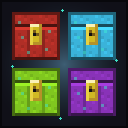
Ender Palette lets you dye your Ender Chest in all 16 colors — and each color is its own separate storage. A blue Ender Chest opens your blue inventory, a red one opens your red, and so on. Every player gets up to 16 private vaults, one per color.
It's a small, pure-addition mod: it never changes the vanilla Ender Chest, so it's safe to drop into any pack and works the same in singleplayer and on servers.
How it works
- Dye an Ender Chest any color. Combine an Ender Chest with a dye to color it (see crafting below).
- Each color is its own storage. A blue chest only shows what you put in blue chests; a red chest only shows your red contents. That's 16 independent 27-slot inventories per player.
- Same color, shared everywhere. Every blue chest you place (or anyone's blue chest you open) opens your blue storage — just like the vanilla Ender Chest, but per color.
- Break them freely. Breaking a chest drops the block back; your stored items live on you, not the block, so nothing is ever lost when you pick one up to move it.
Crafting
| Goal | Recipe (shapeless — any arrangement) |
|---|---|
| Color a chest | Ender Chest + matching Dye → that color (e.g. Ender Chest + Blue Dye → Blue Ender Chest) |
| Recolor | Any colored chest + a different Dye → the new color |
The recipe accepts the vanilla Ender Chest or any colored one, so you can freely recolor like shulker boxes. (Craft the base Ender Chest the usual way: 8 Obsidian around 1 Eye of Ender.)
Multiplayer
Built for servers. Storage lives on the server-side player and the chest opens the vanilla container screen, so it syncs with no extra setup. Each player has their own 16 vaults — your blue chest and a friend's blue chest are separate. Install the mod on the server and on each client.
Compatibility
- Minecraft 1.21.11, Fabric (requires Fabric API).
- Does not touch or conflict with the vanilla Ender Chest or other storage mods.
Modpacks are welcome — no need to ask. Please don't re-upload or redistribute the mod outside its official pages.
- Edition: Minecraft Java
- File type: .jar
- Minecraft version listed: 26.2
- How to install: Install the matching mod loader (Forge, Fabric or NeoForge) for your Minecraft version. → Download the .jar. → Put it in the .minecraft/mods folder and launch that loader profile.
- Where to get it: Opens on Modrinth — not every file is mirrored on our own servers.
Install steps are the general flow for this file type — How to install Minecraft Java mods & modpacks walks through it step by step.
- Ships as enderpalette-0.1.1.jar — drop this file into the mods folder
- Download size: 63 KB
- Download link checked 20 Oct 2026 — working
These come from our own check of the pack file, not from the source page.