
Cowboy's Multi Keybinds
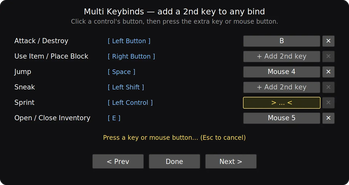
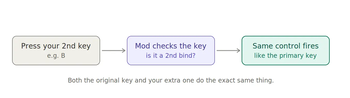
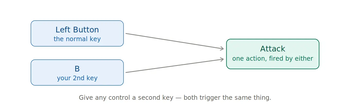
Have you ever wanted to perform one action using two different keys? Minecraft only allows you to assign a control to a single key. This feature solves that problem. You can give any keybind a second key or mouse button, and both will activate it. Want to attack using left-click and B? Sprint using both your usual key and a side mouse button? Go ahead.
How to use it
Press ] to open the Multi-Keybinds menu (you can change this key in Options → Controls). Click the button next to any control. Press the key or mouse button you want to use as its second trigger. Done.
The little X clears a second key if you change your mind. Your binds are saved and remain between sessions. It starts off empty; nothing is pre-set, so it won't interfere with your controls until you decide to use it. It also won't alter any keybinds you haven’t set up yourself.
Notes
This works with both held actions (like movement, sneak, and attack) and tap actions (like inventory, drop, and swap). It only runs on the client side. It is safe to use on any server—vanilla, realms, or otherwise—because it only manages your own input. This feature requires Fabric API.
Built for Minecraft 1.21.11.
- Edition: Minecraft Java
- File type: .jar
- Minecraft version listed: 1.21.11
- How to install: Install the matching mod loader (Forge, Fabric or NeoForge) for your Minecraft version. → Download the .jar. → Put it in the .minecraft/mods folder and launch that loader profile.
- Where to get it: Opens on Modrinth — not every file is mirrored on our own servers.
Install steps are the general flow for this file type — How to install Minecraft Java mods & modpacks walks through it step by step.
- Ships as cowboys-multi-keybinds-1.0.0.jar — drop this file into the mods folder
- Download size: 21 KB
- Download link checked 10 Sept 2026 — working
These come from our own check of the pack file, not from the source page.