
Paper Client
Java mod listed for Minecraft 1.21. Downloads from the MC Java Mods app on Android.
paper Client is a client-side Fabric mod that adds a customizable HUD, keystrokes, custom crosshair tools, a local cape system, waypoints, visual…
⬇ Download on Modrinth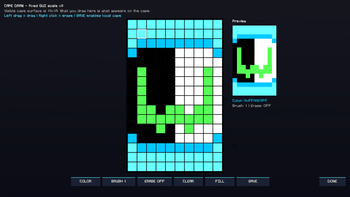
paper Client
paper Client is a client-side Fabric mod for Minecraft that adds HUD customization, keystrokes, waypoints, visual customization, local cape tools, custom crosshair tools, and performance-friendly client options.
The mod is focused on improving the client-side experience. It does not add new blocks, items, mobs, dimensions, structures, crafting recipes, or server-side gameplay mechanics. Most features are visual, cosmetic, informational, or related to local client settings.
paper Client is mainly made for players who want a cleaner interface, more control over their HUD, useful on-screen information, and simple customization tools inside one client-side mod.
Main Features
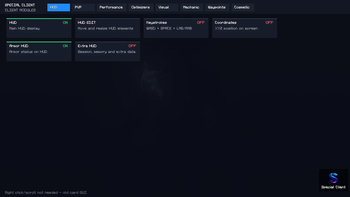
Editable HUD
paper Client includes an in-game HUD editor that lets players move HUD elements directly on the screen.
Instead of editing a config file manually, players can open the HUD editor and drag HUD elements to the position they want. The HUD editor is made to feel like an in-game overlay, so the player can place elements while seeing how they will look on the screen.
Supported HUD elements can be positioned separately. Some HUD elements can also be resized separately, so changing the size of one HUD element does not force every other HUD element to use the same size.
The HUD system can include:
- FPS counter
- Ping counter
- Coordinates display
- Direction display
- Movement speed display
- Memory usage display
- Clock
- Potion/effects counter
- Light level display
- Day counter
- Server information
- FPS graph
- Armor HUD
- Keystrokes HUD
- Extra HUD information
This is useful for players who want a simple screen, a PvP-style layout, a recording-friendly setup, or a more detailed information display.
Separate HUD Layout
Each HUD element has its own screen position. This means the player can place FPS, ping, coordinates, keystrokes, armor, and other elements in different places.
Supported elements can also have separate scaling. For example, the player can make the FPS display larger while keeping ping, coordinates, and keystrokes smaller.
This gives more control over the final HUD layout and makes it easier to build a personal setup.
Keystrokes Display
paper Client includes a keystrokes overlay for showing player input on screen.
The keystrokes display can show:
- W
- A
- S
- D
- Space
- LMB
- RMB
This is useful for gameplay recordings, PvP clips, tutorials, or players who like seeing their movement and mouse input while playing.
The keystrokes display can be moved and resized from the HUD editor.
Armor HUD
The mod includes an armor HUD for showing armor information on screen. This can help players keep track of armor status without needing to constantly open the inventory.
Depending on the enabled settings, the HUD can also show durability-related information or armor percentage information.
Extra HUD Information
paper Client includes extra HUD options for showing more detailed information.
Extra HUD information may include:
- Held item information
- Armor percentage
- Food level
- Movement state
- Chunk position
- Dimension information
- Looking block position
- Entity counter
- Session-related information
These options are useful for players who want more information on screen while exploring, playing survival, or recording gameplay.
Custom Crosshair
paper Client includes a custom crosshair system.
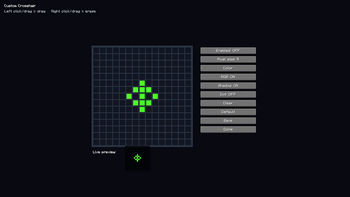
The crosshair system allows players to customize their crosshair instead of using only the default Minecraft crosshair. The mod includes a grid-style crosshair editor where players can draw and save their own design.
The custom crosshair is visual only. It does not change aim behavior, reach, hitboxes, attack timing, or any server-side combat mechanic.
This feature is useful for players who want a cleaner crosshair, a PvP-style crosshair, or a crosshair that matches their personal preference.
Local Custom Cape
paper Client includes a local custom cape system.
Players can design or use a local cape on their own client. This is mainly for personal visual customization. The cape is local, so it is not a server-side cape system and other players may not see it unless they are using a compatible setup.
This feature is useful for players who want to customize how their character looks on their own screen.
Waypoints
Special Client includes a client-side waypoint system.
Waypoints can be used to save important locations and display indicators for them in-game. This can help players remember locations such as bases, farms, portals, mines, villages, or other important places.
Waypoint features may include:
- Saving locations
- Managing saved waypoints
- Showing waypoint indicators
- Showing distance to waypoints
- Showing a waypoint list in the HUD
- Optional waypoint icons
- Optional waypoint glow effects
- Optional waypoint colors or RGB effects
- Quick waypoint controls
The waypoint system is client-side and is meant for navigation and organization.
Visual Options
Special Client includes several client-side visual customization options.
Visual features may include:
- Fullbright
- Zoom
- Clearer view options
- Low fire option
- Damage tint option
- Hit color option
- HUD colors
- HUD background
- HUD RGB text
- Keystrokes RGB
- GUI customization
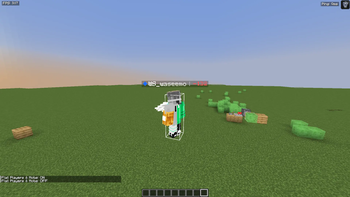
- Flat/2D players and mobs visual option
- Optional cosmetic effects
These features are client-side. They change how the game looks on the player’s screen, not how the server works.
Mechanic / Comfort Options
Special Client includes some comfort options that affect how the client feels.
These may include:
- Free look
- Toggle sprint
- Toggle sneak
- Zoom key
- HUD alerts
- Perspective indicator
These features are meant to make the game more comfortable to use. Some multiplayer servers may have rules about features like free look or certain visual tools, so players should check server rules before using them.
Alerts
Special Client includes alert options that can show warnings on the screen.
Alert options may include:
- Low health warning
- Low durability warning
- Potion/effect warning
- Missing totem warning
- Session stats
These alerts are useful for survival, PvP, or general gameplay because they help the player notice important information faster.
Item Counters
The mod can include item counter HUD options for useful items.
Possible item counters include:
- Totems
- Arrows
- Golden apples
- Ender pearls
- End crystals
- Respawn anchors
- Attack cooldown information
These counters are client-side HUD information only. They do not change item behavior or server gameplay.
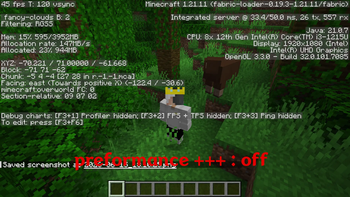
Performance-Friendly Options
paper Client includes performance-friendly client settings.
These settings are designed to reduce local client-side rendering load by disabling or reducing optional visual effects. They are not server optimizations and they do not improve server TPS.
Performance-related options may include:
- Potato Mode
- PvP Performance mode
- Minimal HUD mode
- Hide Cosmetics mode
- Simple Particles mode
- Reduce Weather
- Reduce Clouds
- Entity Render Budget
- HUD Budget mode
- Waypoint Budget mode
- Particle Budget mode
- Auto Lag Guard
- Memory Cleaner
- Disabling heavy RGB effects
- Reducing optional waypoint effects
- Reducing unnecessary visual rendering
These options are meant to help reduce client-side stutter on some systems. Results can vary depending on the player’s computer, Minecraft settings, installed mods, world size, render distance, and server conditions.
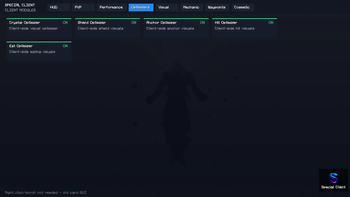
Local Visual Optimizers
paper Client includes several local visual optimizer toggles.
These may include:
- Crystal Visual Optimizer
- Shield Visual Optimizer
- Anchor Visual Optimizer
- Hit Visual Optimizer
- Eating Visual Optimizer
These are intended as local visual/performance-related options. They do not change server-side combat mechanics and do not add automatic combat behavior.
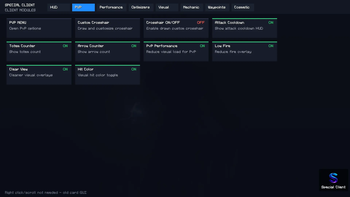
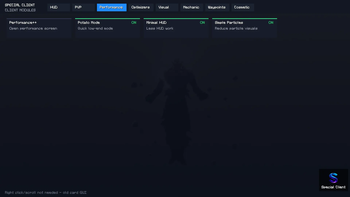
GUI Menu
paper Client includes a custom menu for accessing and configuring the mod’s features.
The menu organizes features into categories such as HUD, Visual, Performance, Optimizers, Waypoints, Cosmetic, and Mechanic options.
This makes the mod easier to configure from inside the game instead of editing files manually.
What paper Client Adds
paper Client adds:
- Editable HUD system
- Movable HUD elements
- Separate HUD scaling for supported elements
- FPS counter
- Ping counter
- Coordinates display
- Direction display
- Speed display
- Memory display
- Clock
- Potion/effects counter
- Biome or dimension information
- Light level display
- Day counter
- Server information
- FPS graph
- Extra HUD information
- Armor HUD
- Keystrokes overlay
- Custom crosshair editor
- Local custom cape system
- Waypoints
- Waypoint indicators
- Waypoint HUD list
- Visual customization options
- Fullbright
- Zoom
- Free look
- Toggle sprint
- Toggle sneak
- HUD alerts
- Item counters
- Client-side performance options
- Local visual optimizer toggles
- Custom GUI menu
What paper Client Does Not Add
paper Client does not add server-side content.
It does not add:
- New blocks
- New items
- New mobs
- New dimensions
- New structures
- New biomes
- New crafting recipes
- New server-side mechanics
It also does not improve real network ping, server TPS, or server performance. Any performance options are focused only on reducing local client-side rendering load.
Limitations and Known Downsides
paper Client has some limitations because it is a client-side customization mod.
Performance can vary
The performance options may help some players, but results are not guaranteed. FPS depends on the player’s computer, graphics settings, other installed mods, render distance, shader packs, resource packs, and world/server conditions.
Some visual features, such as RGB effects, waypoint effects, extra HUD modules, or flat entity rendering, may reduce FPS on lower-end systems.
Local cape limitation
The cape system is local. This means the cape is mainly visible on the player’s own client. Other players may not see the cape unless they are using a compatible system.
Client-side only
Most features are client-side only. The mod does not add server content and does not require a server installation for most features.
Server rules
Some multiplayer servers may not allow certain client-side features such as waypoints, free look, visual overlays, or other client modifications. Players should always check the rules of the server they are playing on before using the mod.
Possible mod conflicts
Because paper Client changes HUD rendering, client visuals, and some input-related features, it may conflict with other client-side HUD mods, crosshair mods, waypoint mods, cape mods, or performance mods.
If another mod edits the same HUD, GUI, crosshair, camera, or rendering behavior, some features may overlap or behave differently.
Visual features are optional
Some features are cosmetic or preference-based. Not every player will want all HUD modules enabled at the same time. The mod is best used by enabling only the features the player actually wants.
Not a server optimizer
paper Client does not optimize servers. It cannot fix server lag, high server TPS issues, or bad internet routing. It only provides client-side options that may help local FPS or reduce client-side stutter.
Recommended Use
For the best experience, players should enable only the HUD elements and visual options they need.
If FPS is lower than expected, it is recommended to disable heavy cosmetic options such as RGB effects, waypoint glow, extra particles, flat entity rendering, or unnecessary HUD modules.
Summary
paper Client is a client-side Fabric mod that adds a customizable HUD, keystrokes, custom crosshair tools, a local cape system, waypoints, visual customization, alerts, item counters, client-side optimizer options, and a custom GUI menu.
It is made for players who want a more customizable Minecraft client while keeping the mod focused on client-side features instead of adding server-side gameplay content.
- Edition: Minecraft Java
- File type: .jar
- Minecraft version listed: 1.21.11
- How to install: Install the matching mod loader (Forge, Fabric or NeoForge) for your Minecraft version. → Download the .jar. → Put it in the .minecraft/mods folder and launch that loader profile.
- Where to get it: Opens on Modrinth — not every file is mirrored on our own servers.
Install steps are the general flow for this file type — How to install Minecraft Java mods & modpacks walks through it step by step.
- Ships as paper-client-1.3.0.jar — drop this file into the mods folder
- Download size: 31.8 MB
- Download link checked 17 Oct 2026 — working
These come from our own check of the pack file, not from the source page.