
HitboxCustom
Java mod listed for Minecraft 26.x. Downloads from the MC Java Mods app on Android.
A complete revamp of F3+B hitboxes into a powerful tactical tool. Custom opacity, thickness, and colors for 90+ mobs, items, and players.
⬇ Download on Modrinth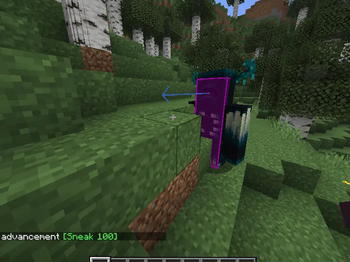
🟣 HitboxCustom
Tired of the default, hard-to-see, eye-burning white hitboxes in Minecraft? HitboxCustom completely revamps the vanilla F3 + B bounding boxes, turning them into a highly customizable tactical tool for survival, hardcore, and technical play!
✨ Features
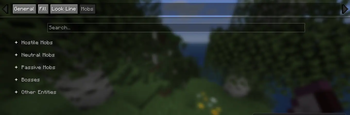
- 📊 Dynamic Entity Categorization:** No more chaotic single-color lines! All 90+ entities are automatically sorted into 5 neat dropdown categories: Hostile, Neutral, Passive, Bosses, and Other Entities.
- 🎯 Individual Mob Customization:** Want Creepers to be neon pink and Zombies to be dark crimson? Every single mob in the game can be assigned its own unique color via a built-in search bar.
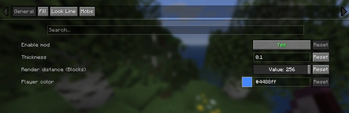
- 🤏 Ultra-Thin Outlines: Adjust the edge thickness from a massive
8.0down to a razor-thin0.1. Perfect for late-night gaming sessions to prevent eye strain. - 🧊 Custom Box Filling: Toggle hitbox transparency/fill from completely invisible (
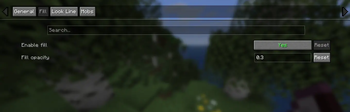
0.0) to fully opaque (1.0) to get a better sense of entity volume. - 🎒 Item & Player Support:** Dedicated color sliders for items dropped on the ground and players (visible in 3rd person).
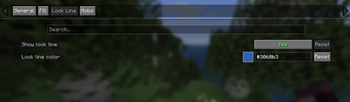
- 👁️ Look Vector Customization:** Toggle or recolor the look line (eye vector) for living entities.
- 📉 FPS-Friendly Performance: Built entirely using modern Gizmos rendering mechanics. Zero performance drops, zero chunk redraws, even with hundreds of entities nearby.
🛠️ Configuration & Requirements
To open the settings menu, you will need:
- Cloth Config API (Dependency)
- Mod Menu (To view the mod list and click the configuration gear)
Go to your Mod Menu list, click on HitboxCustom, and fine-tune every parameter to your liking in real-time!
🌍 Supported Languages
The config menu is fully translated into 5 languages:
- English
- Russian
- Spanish
- German
- French
Note: All 90+ mob names inside the menu are automatically grabbed from Minecraft's registry, meaning they will perfectly match whatever language your game is currently set to!
🚀 Future Plans
This is an Alpha release. Future updates will focus on hotkeys, health-based color shifts, and potential companion mods for a better vanilla experience.
Created with pure dedication by DictatoSteve.
- Edition: Minecraft Java
- File type: .jar
- Minecraft version listed: 26.1.2
- How to install: Install the matching mod loader (Forge, Fabric or NeoForge) for your Minecraft version. → Download the .jar. → Put it in the .minecraft/mods folder and launch that loader profile.
- Where to get it: Opens on Modrinth — not every file is mirrored on our own servers.
Install steps are the general flow for this file type — How to install Minecraft Java mods & modpacks walks through it step by step.
- Ships as hitboxcustom-1.0.0.jar — drop this file into the mods folder
- Download size: 198 KB
- Download link checked 21 Oct 2026 — working
These come from our own check of the pack file, not from the source page.