
A feature-rich in-game shop mod for minecraft, allowing players to buy and sell items through a graphical interface with a built-in currency system!!!
Features
- Graphical Shop Interface — Browse items across categories with an intuitive GUI.
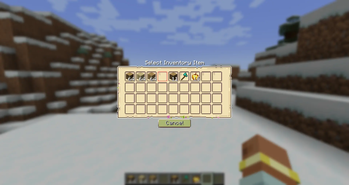
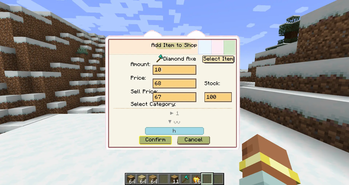
- Player Trading — Players can list their own items for sale and set both buy,sell prices, quantity, and inventory for buying and selling goods. All changes sync to all online players.
- Currency System — Built-in per-player money, stored persistently.
- Key Binding — Quick shop access with the "N" key, customizable in controls settings.
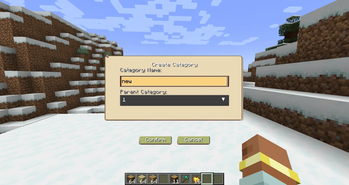
- Category Management — Create, delete, and manage shop categories, right-click to edit category name,parent-child category hierarchy support.
- Item Banning — Admins can ban specific items from being listed
- Configurable Permissions — Toggle which actions require admin privileges
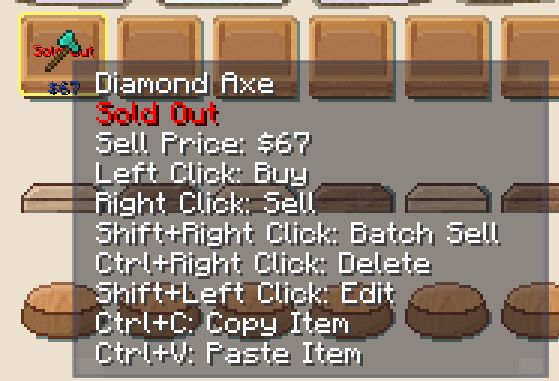
- Item Copy & Paste — Copy item info with Ctrl+C while hovering,paste item to current category with Ctrl+V or pasted items added at the end of category.Copies all item properties: item, prices, stock.
- Bilingual Support — Full Chinese and English translationuts
- Auto-Save — Automatic data persistence every 5 seconds, shop data saved to world directory.Reliable data recovery on server restart.
- Item Display — Price display overlay on items (buy/sell prices).
- Shop Data Import/Export — Export /shop export Import /shop import . Exported files are saved in /shop exports/.json.
- Category Sorting and Edit — Move Up /shop category moveup . Move Down /shop category movedown .Right mouse button to edit name.
Hotkey
| Hotkey | Description |
|---|---|
| Default: N | Open shop (configurable in Controls settings) |
Player Commands
| Command | Description | Example |
|---|---|---|
| /shop(This command does not exist in the 1.20.1 Forge version. Please press N.) | Open shop interface | /shop |
| /shop balance | Check current balance | /shop balance |
| /shop sell <price> [amount] | List item in hand for sale | /shop sell 100 or /shop sell 100 64 |
| /shop category create <ID> <name> | Create a new category | /shop category create blocks Blocks |
| /shop category list | List all categories | /shop category list |
Admin Commands (Requires Permission Level 2)
| Command | Description | Example |
|---|---|---|
| /shop add <player> <amount> | Add money to player's balance | /shop add Steve 1000 |
| /shop set <player> <amount> | Set player's balance | /shop set Steve 5000 |
| /shop reload | Reload shop data | /shop reload |
| /shop clear | Clear all shop items | /shop clear |
| /shop category moveup <category_name> | Move category up in order | /shop category moveup Blocks |
| /shop category movedown <category_name> | Move category down in order | /shop category movedown Blocks |
| /shop category setparent <child> <parent> | Set category's parent category | /shop category setparent "ChildName" ParentName |
| /shop category setparent <child> none | Remove category's parent | /shop category setparent "ChildName" none |
| /shop ban <item_id> | Ban an item from being listed | /shop ban minecraft:bedrock |
| /shop unban <item_id> | Unban a previously banned item | /shop unban minecraft:bedrock |
| /shop banlist | View list of banned items | /shop banlist |
| /shop export <filename> | Export shop data to JSON | /shop export shop_backup |
| /shop import <filename> | Import shop data from JSON | /shop import shop_backup |
Shop Interface Controls
| Action | Description |
|---|---|
| Left Click Item | Buy item(cannot buy if stock is 0) |
| Right Click Item | Sell 1 item(stock +1 after selling) |
| Shift + Right Click Item | Batch sell (sell all of that item in inventory,(stock +1 after selling) |
| Ctrl + Right Click Item | Delete your own listing |
| Shift + Left Click Item | Edit your own listing (amount, price, category, stock) |
| Ctrl + C (hover on item) | Copy item |
| Ctrl + V | Paste item to current category (added at the end) |
Quick facts
- Edition: Minecraft Java
- File type: .jar
- Minecraft version listed: 1.21.1
- How to install: Install the matching mod loader (Forge, Fabric or NeoForge) for your Minecraft version. → Download the .jar. → Put it in the .minecraft/mods folder and launch that loader profile.
- Where to get it: Opens on Modrinth — not every file is mirrored on our own servers.
Install steps are the general flow for this file type — How to install Minecraft Java mods & modpacks walks through it step by step.
Verified by MCModsHub
- Ships as pomeloshopmod-1.21.1-1.0.3.jar — drop this file into the mods folder
- Download size: 280 KB
- Download link checked 21 Aug 2026 — working
These come from our own check of the pack file, not from the source page.