
Weather Forecast HUD
Tiny top-left HUD that shows current weather (Clear / Rain / Thunder) with intensity, a rising/falling trend marker, and an estimated time-to-change in…
⬇ Download on Modrinth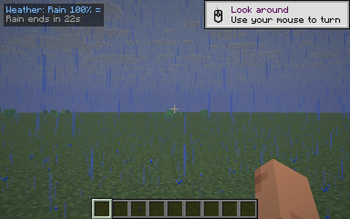
Weather Forecast HUD turns Minecraft's invisible weather timer into a one-glance badge. Vanilla never tells you whether it's about to rain, how long the storm will last, or how close clear skies are — you just stand in the rain and guess. This mod surfaces all of it.
What it shows
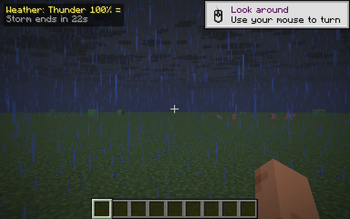
A small two-line badge in the top-left corner:
Weather: Rain 78% +
Rain ends in 1m 12s
- Line 1 — the current state (
Clear,Rain XX%,Thunder XX%) plus a trend marker:+rising — rain/thunder intensity is building up,-falling — the storm is fading,=steady — gradient hasn't moved this second.
- Line 2 (singleplayer only) — a friendly countdown:
Rain in 4m 20swhen it's clear,Rain ends in 1m 12swhen it's raining,Storm ends in 42sduring a thunderstorm.
Colors match the mood: cyan for rain, yellow for thunder, warm gold for clear skies.
Controls
- B — toggle the HUD on / off (chat message confirms the new state).
The keybind uses raw GLFW polling so it works identically across every supported Minecraft version.
Compatibility
Works on Minecraft 1.21.8, 1.21.9, 1.21.10, and 1.21.11 (Fabric Loader 0.16+). One JAR covers all four versions.
- Pure client-side: install on the client only, works on any server, no game-state changes.
- Hides automatically when you press F1, and while any GUI screen is open.
- The time-to-change line only renders in singleplayer; on servers the badge stays at one line (percent + trend still work).
- No config file, no dependencies beyond Fabric API.
- Edition: Minecraft Java
- File type: .jar
- Minecraft versions listed: 1.21.8, 1.21.9, 1.21.10
- How to install: Install the matching mod loader (Forge, Fabric or NeoForge) for your Minecraft version. → Download the .jar. → Put it in the .minecraft/mods folder and launch that loader profile.
- Where to get it: Opens on Modrinth — not every file is mirrored on our own servers.
Install steps are the general flow for this file type — How to install Minecraft Java mods & modpacks walks through it step by step.
- Ships as weatherhud-1.0.0.jar — drop this file into the mods folder
- Download size: 8 KB
- Download link checked 11 Sept 2026 — working
These come from our own check of the pack file, not from the source page.