
Arrow Attachments
Fuse anything. Shoot everything.
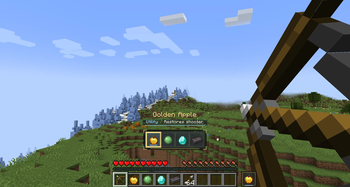
Arrow Attachments brings a Zelda: Tears of the Kingdom–inspired fusion system to Minecraft's ranged combat. Draw your bow, pick an item from a sleek in-game picker, and fuse it directly into your arrow — turning every shot into a tactical decision, a movement tool, or beautiful chaos.
How It Works
While aiming with a bow or holding a loaded crossbow, a compact attachment picker appears above your hotbar. It shows only compatible items from your inventory — no clutter, no scrolling past junk.
- Aim your bow (or hold a loaded crossbow)
- Pick an attachment with the mouse wheel or arrow keys
- Release — your item is fused into the projectile
A dedicated slot next to your hotbar always shows your last selected attachment, and the mod remembers your previous choice, so re-firing the same fusion takes zero extra clicks.
Attachment Effects
Every supported item has its own handcrafted effect. A few highlights:
| Attachment | Effect |
|---|---|
| Diamond | High-damage precision shot |
| Slime Ball | Arrow bounces once off blocks |
| Ender Pearl | Teleports you to the impact point |
| TNT | A real block-breaking explosion on impact — no placed block, just boom |
| Firework Rocket | Launches as an actual rocket — and can lift mobs into the air |
…plus many more attachments adding elemental damage, movement effects, crowd control, magic impacts, utility shots, and chaotic surprises.
Built to Feel Vanilla+
- Compact, smoothly animated UI with a magical "fusion" glow
- Readable and close to Minecraft's vanilla style — no bloated HUD
- Full crossbow support, including loaded-crossbow selection
- Multishot-friendly: only one attachment is consumed per shot — no wasted items
Feature Overview
- Zelda-inspired projectile fusion system
- Works with bows and crossbows
- Smooth animated attachment picker (mouse wheel + arrow keys)
- Picker shows only implemented, compatible items
- Last-used attachment slot next to the hotbar
- Automatic memory of your previous selection
- TNT arrows create real block-breaking explosions
- Firework arrows launch as rockets and can carry mobs upward
- Bouncing Slime Ball arrows
- Ender Pearl teleport arrows
- Many more unique per-item effects
- Multishot consumes only one attachment per volley
- Clean, polished, fusion-styled UI
Why You'll Love It
Ranged combat stops being "shoot arrow, repeat." Suddenly your inventory is your arsenal: every item becomes a new combat option, escape plan, mining trick, or gloriously unpredictable experiment.
Grab a bow. Open your inventory. Start fusing.
Mod Loader: Fabric
- Edition: Minecraft Java
- File type: .jar
- Minecraft version listed: 1.21.1
- How to install: Install the matching mod loader (Forge, Fabric or NeoForge) for your Minecraft version. → Download the .jar. → Put it in the .minecraft/mods folder and launch that loader profile.
- Where to get it: Opens on Modrinth — not every file is mirrored on our own servers.
Install steps are the general flow for this file type — How to install Minecraft Java mods & modpacks walks through it step by step.
- Ships as arrow-attachments-1.0.0.jar — drop this file into the mods folder
- Download size: 55 KB
- Download link checked 11 Sept 2026 — working
These come from our own check of the pack file, not from the source page.