
Micro Redstone Components
Java mod listed for Minecraft 1.16. Downloads from the MC Java Mods app on Android.
⬇ Download on Modrinth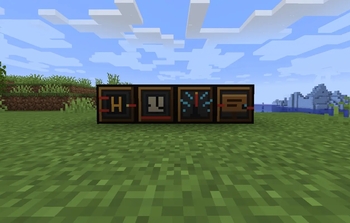
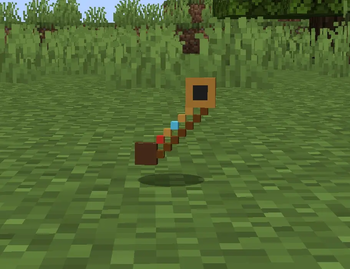
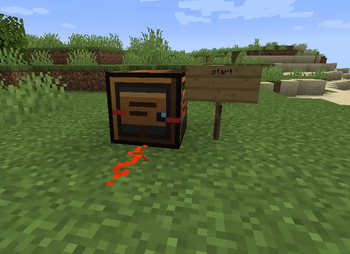
A small tool for copying block settings between identical blocks.
| Action | How |
|---|---|
| Copy | Hold tuner → Shift + Right-click a micro block |
| Paste | Right-click another block of the same type |
Copied settings appear in the item tooltip. After paste, a chat message confirms what was applied.
Recipe: redstone + iron + stick
Configuring blocks
Right-click any micro block (without Shift) to open the config menu.
You can type a value or use preset buttons, then press Save.
| Block | Valid values |
|---|---|
| Micro Logic Gate | AND, OR, NOT |
| Micro Timer | 2 – 40 (ticks) |
| Wireless Redstone | 0 – 15 (channel) |
| Sign Reader | any word, e.g. door, start, factory |
Example setups
1. Sign-triggered machine stop
[Sign: "stop"] → Sign Reader → Redstone Dust → Create Clutch → Motor
When the sign says stop, the reader powers the clutch and stops the motor.
2. Wireless factory alarm
Button → Wireless (ch. 3)     ...anywhere...
Wireless (ch. 3) → Lamp / Note Block
3. Copy timer delay across machines
Timer (delay 20) → Shift+RClick with Tuner → RClick other Timers
Compatibility
| Minecraft | 1.16.5 |
| Loader | Forge 36.1.0+ |
| Java | 8 |
| Create | Works alongside Create 1.16.5 (v0.3.2+) — not a Create addon, no Create API dependency |
| JEI | Recipes show automatically |
This mod does not require Create. It is tested to run next to Create in modpacks.
Localization
- English (
en_us) - Russian (
ru_ru)
License
MIT — free to use in modpacks. Credit appreciated but not required.
Русский / Russian
Micro Redstone Components — компактные редстоун-блоки для Forge 1.16.5.
Блоки
- Микро-логический элемент — AND / OR / NOT
- Микро-таймер — задержка 2–40 тиков
- Беспроводной редстоун — 16 каналов (0–15)
- Считыватель табличек — читает текст с соседних табличек
- Микро-настройщик — копирует/вставляет настройки
Настройка
- ПКМ по блоку — меню настроек
- Shift + ПКМ с настройщиком — копировать
- ПКМ с настройщиком — вставить (тот же тип блока)
После вставки в чат пишется: [Micro Tuner] Applied settings: ...
Совместимость
Forge 1.16.5, Java 8. Работает рядом с Create, но не зависит от него.
Issues & feedback: open an issue on the project repository or leave a comment on Modrinth.
- Edition: Minecraft Java
- File type: .jar
- Minecraft version listed: 1.16.5
- How to install: Install the matching mod loader (Forge, Fabric or NeoForge) for your Minecraft version. → Download the .jar. → Put it in the .minecraft/mods folder and launch that loader profile.
- Where to get it: Opens on Modrinth — not every file is mirrored on our own servers.
Install steps are the general flow for this file type — How to install Minecraft Java mods & modpacks walks through it step by step.
- Ships as microredstone-0.1.1-1.16.5.jar — drop this file into the mods folder
- Download size: 51 KB
- Download link checked 4 Oct 2026 — working
These come from our own check of the pack file, not from the source page.