No Bad Effects
No Bad Effects removes Minecraft's most annoying visual status effects and screen overlays, letting you enjoy a cleaner and more comfortable experience without changing gameplay.
Whether you dislike nausea distortion, darkness pulses, blindness fog, or powder snow visibility reduction, No Bad Effects gives you full control with simple per-effect toggles.
✨ Features
🌀 Remove Nausea distortion — disables the screen warping effect caused by Nausea and Nether Portals
⬛ Remove Darkness — disables the Darkness effect and Warden-induced visual dimming
👁️ Remove Blindness fog — restores visibility while affected by Blindness
❄️ Remove Powder Snow fog — removes the visibility-reducing fog inside Powder Snow
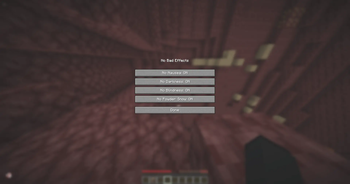
⚙️ Individual toggles — enable or disable each effect separately
🪶 Lightweight & client-side — no gameplay changes, no unnecessary overhead
💾 Automatically saved — your preferences persist between sessions
🎛️ Configuration
Open the configuration screen through Mod Menu and toggle the effects you want to disable.
Changes are applied instantly and saved automatically.
📦 Requirements
- Fabric Loader
- Fabric API
- Mod Menu (optional, recommended)
🔒 Client-Side Only
No Bad Effects only modifies visual rendering on your client and does not affect gameplay mechanics.
Safe to use on multiplayer servers.;
Why?
Many players find certain visual effects distracting, uncomfortable, or simply unnecessary. No Bad Effects allows you to remove those effects while preserving the vanilla gameplay experience.
Made with ♥ by xien.
- Edition: Minecraft Java
- File type: .jar
- Minecraft version listed: 1.13.2
- How to install: Install the matching mod loader (Forge, Fabric or NeoForge) for your Minecraft version. → Download the .jar. → Put it in the .minecraft/mods folder and launch that loader profile.
- Where to get it: Opens on Modrinth — not every file is mirrored on our own servers.
Install steps are the general flow for this file type — How to install Minecraft Java mods & modpacks walks through it step by step.
- Ships as nobadeffects-1.5.5+1.21.8.jar — drop this file into the mods folder
- Download size: 80 KB
- Download link checked 11 Sept 2026 — working
These come from our own check of the pack file, not from the source page.