Translator (NeoForge)
Java mod listed for Minecraft 1.21. Downloads from the MC Java Mods app on Android.
⬇ Download on Modrinth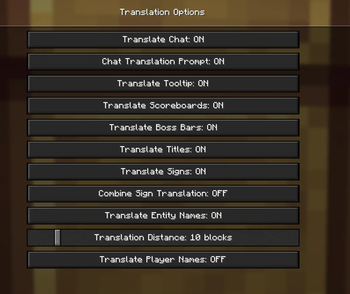
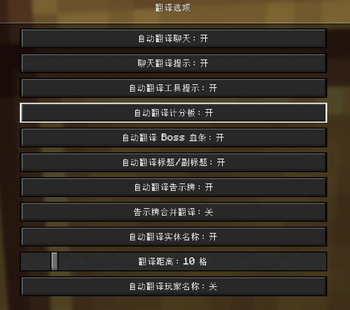
This mod serves as a translation tool within the game, designed to translate text found in various in-game elements without altering world data. It supports chat, scoreboards, boss bars, titles, tooltips, signs, TextDisplay floating text, books, and more.
Maintained by Gstar (GitHub) — NeoForge 1.21.1, developed with AI-assisted tooling (Cursor). Independent project; see CREDITS.md for design references.
Platform
| Loader | Minecraft | Notes |
|---|---|---|
| NeoForge | 1.21.1 | Requires Cloth Config (NeoForge 15.0.127+) |
Key features
- Non-intrusive translation — client-side only; does not modify the world.
- Hotkeys
- U — open translation options
- O — screen OCR (when the active translator supports images)
- In-game commands
/transconfig— configure translators, languages, cache, and API keys/translate <text>— translate text (result is copyable)/translate-re <text>— reverse translation
- Auto-translate — chat, tooltips, titles, scoreboard, boss bar, signs, entity names / TextDisplay, and more (toggle per feature in options)
Supported translation services
Configure your own API keys in-game (Cloth Config or commands):
- Baidu Translate
- Youdao Translate
- Tencent Cloud Machine Translation
- Bing Translate
- OpenAI-compatible LLM endpoints
Quick start
- Install NeoForge 21.1.216+, Cloth Config API (NeoForge 15.0.127+), and this mod.
- Configure Tencent Cloud (example):
/transconfig tencent <SecretId> <SecretKey> - Set languages:
/transconfig language "Auto" "Chinese (Simplified)" - Press U and enable the auto-translate options you need.
Full command reference: docs/INSTALL.md
Chinese documentation
Simplified Chinese guides are on GitHub (this Modrinth page is English-only):
- Edition: Minecraft Java
- File type: .jar
- Minecraft version listed: 1.21.1
- How to install: Install the matching mod loader (Forge, Fabric or NeoForge) for your Minecraft version. → Download the .jar. → Put it in the .minecraft/mods folder and launch that loader profile.
- Where to get it: Opens on Modrinth — not every file is mirrored on our own servers.
Install steps are the general flow for this file type — How to install Minecraft Java mods & modpacks walks through it step by step.
- Ships as Translator-1.21.1-0.0.2.jar — drop this file into the mods folder
- Download size: 244 KB
- Download link checked 30 Sept 2026 — working
These come from our own check of the pack file, not from the source page.