
Happy Ghast Control
Happy Ghast Controls is a lightweight Fabric mod that makes riding Happy Ghasts easier with a Shift auto-forward toggle, timer controls, and a…
⬇ Download on Modrinth



Mach9Games Studio

Happy Ghast Controls


Happy Ghast Controls is a lightweight Fabric mod that makes riding and managing Happy Ghasts easier.
It adds smoother Happy Ghast riding controls, configurable speed, Cargo Harness storage, server permissions, and update notices.
Features
| Feature | Description |
|---|---|
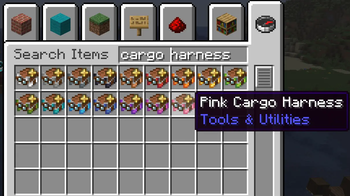
| Cargo Harnesses | Craft storage harnesses in every vanilla harness color. |
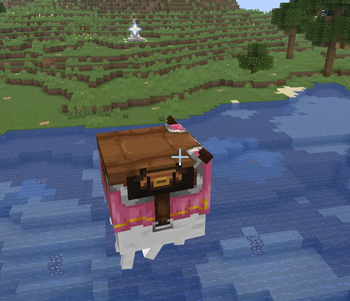
| Cargo Harness Texture | Adds a custom texture for Cargo Harness Happy Ghasts. |
| Happy Ghast Storage | Adds 54-slot storage to Cargo Harness Happy Ghasts. |
| Storage access | Open storage by sneak-right-clicking, or with your inventory key when installed on the client. |
| Movement toggle | Press SHIFT + Forward, default: W, while riding to toggle auto-forward. |
| Speed control | Change Happy Ghast riding speed with /hg speed. |
| Toggle duration | Set how long auto-forward stays active. |
| Permissions | Control storage, crafting, speed commands, and update notices. |
| Update notices | Notify players when a newer compatible Modrinth version is available. |
Cargo Harness

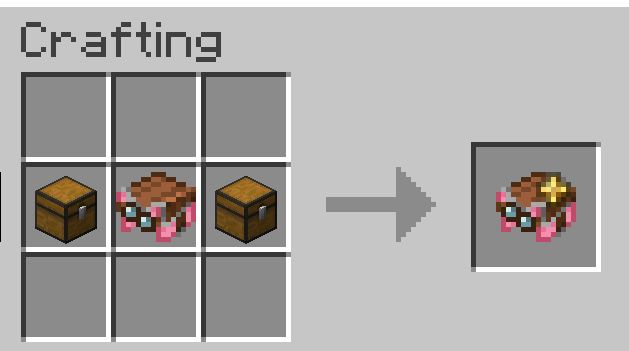
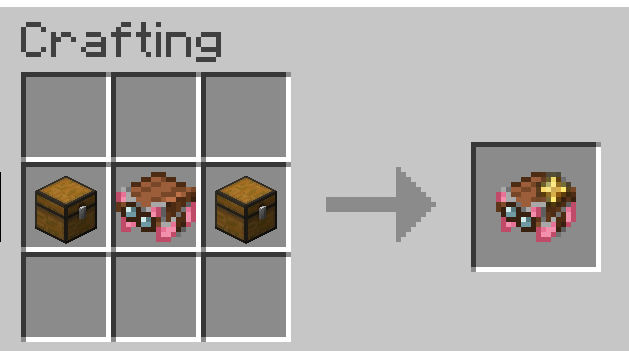
Craft a Cargo Harness using a vanilla harness and 2 chests:
| Crafting | Variants |
|---|---|
 |
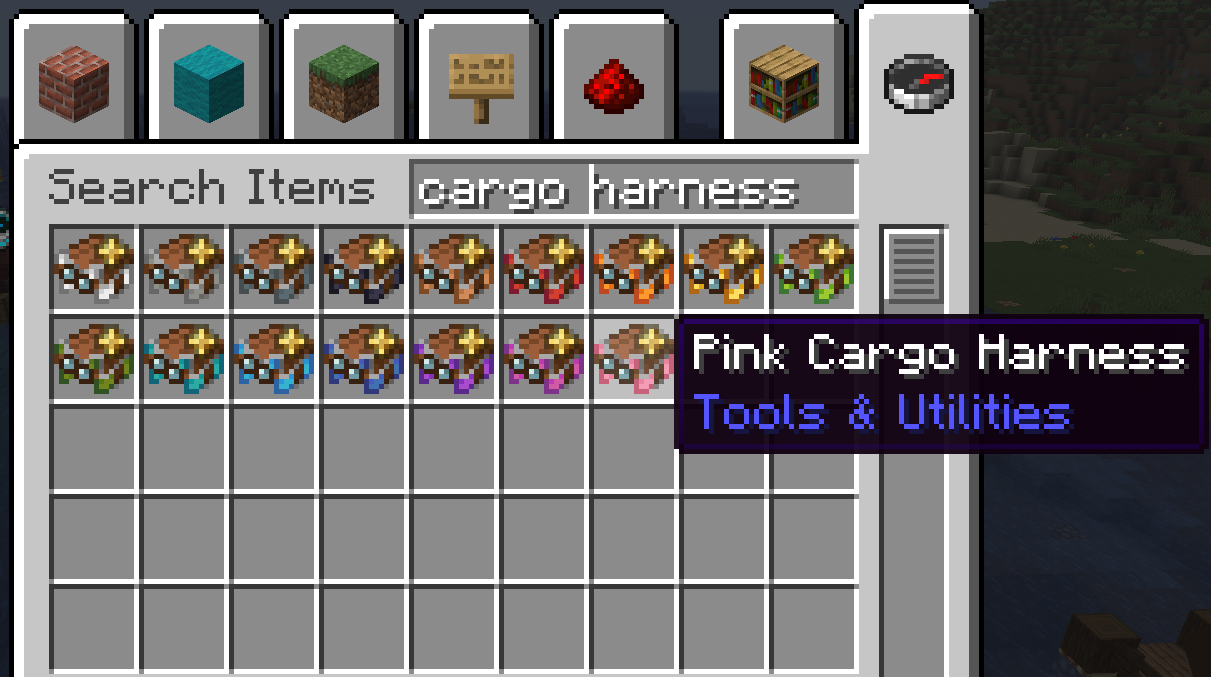 |
Happy Ghasts wearing a Cargo Harness get their own storage.
If the harness is removed, the stored items spill out.
Controls

| Key | Action |
|---|---|
SHIFT + Forward, default: W |
Toggle Happy Ghast auto-forward on or off |
Inventory key, default: E |
Open Happy Ghast Storage while riding, if the client is installed |
V0.2.1 The toggle changed from SHIFT to SHIFT + Forward to avoid conflicts with descending while riding.
Commands
| Command | What it does |
|---|---|
/hg help |
Shows Happy Ghast Controls help |
/hg about |
Shows mod/version information |
/hg speed |
Shows the current Happy Ghast speed multiplier |
/hg speed <multiplier> |
Changes the Happy Ghast speed multiplier |
/hg timer |
Shows the current Shift toggle duration |
/hg timer <seconds> |
Changes how long the Shift toggle stays active |
/happyghast also works as the longer command alias.
V0.2.0 /happyghost depricated (will disapear in the future)
Defaults
| Setting | Default |
|---|---|
| Speed multiplier | 1.25x |
| Toggle duration | Infinite, until toggled off again |
Requirements
| Requirement | Version |
|---|---|
| Mod loader | Fabric |
| Minecraft | 26.1.2 |
| Java | 25 or newer |
| Dependency | Fabric API |
⚙️ Installation
Install the mod like any other Fabric mod:
- Install Fabric Loader.
- Install Fabric API.
- Put Happy Ghast Controls in your
modsfolder. - Launch the game.
Where To Install
Happy Ghast Controls uses the same file for servers, clients, and singleplayer.
| Install location | What you get |
|---|---|
| Server | Happy Ghast storage, Cargo Harness crafting, speed settings, permissions, and update notices. |
| Client | Riding controls, Cargo Harness texture, clearer visuals, and the inventory-key storage shortcut. |
| Singleplayer | Both server and client features. |
Permissions are always checked by the server. Installing the mod on your client does not bypass server permissions.
- Edition: Minecraft Java
- File type: .jar
- Minecraft version listed: 26.1.2
- How to install: Install the matching mod loader (Forge, Fabric or NeoForge) for your Minecraft version. → Download the .jar. → Put it in the .minecraft/mods folder and launch that loader profile.
- Where to get it: Opens on Modrinth — not every file is mirrored on our own servers.
Install steps are the general flow for this file type — How to install Minecraft Java mods & modpacks walks through it step by step.
- Ships as happy-ghast-controls-0.2.1.jar — drop this file into the mods folder
- Download size: 156 KB
- Download link checked 21 Aug 2026 — working
These come from our own check of the pack file, not from the source page.