
ModsJava
TeamCounters
Java mod listed for Minecraft 1.21. Downloads from the MC Java Mods app on Android.
A sleek, client sided Fabric mod that displays how many players are alive in each scoreboard team in a customizable HUD overlay.
⬇ Download on Modrinth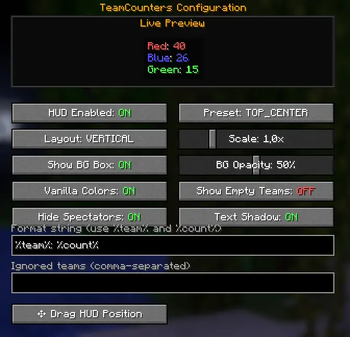
TeamCounters
A sleek, client-sided Fabric mod that displays how many players are alive in each scoreboard team in a customizable HUD overlay.
Features Live team counters shows each team name with player count (e.g. Red: 40 | Blue: 26)
- Fully customizable via the ModMenu config screen:
- Toggle HUD on/off
- Choose from 8 screen position presets (Top Left, Top Right, Center, etc.)
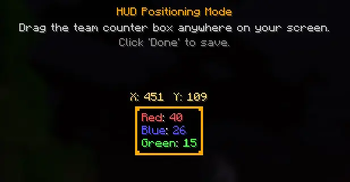
- Drag and drop HUD positioning click "Drag HUD Position" to freely place it anywhere
- Vertical or Horizontal layout
- Adjustable scale (0.5× to 3.0×)
- Background box with adjustable opacity
- Toggle vanilla team colors or use custom color
- Toggle text shadow
- Custom format string (e.g. %team%: %count%)
- Ignore specific teams by name (comma-separated)
- Filter out spectators
- Live preview in the config screen see changes in real time before saving
- Settings saved automatically to config/teamcounters.json
Requirements
- Fabric Loader ≥ 0.19.3
- Fabric API
- ModMenu (optional, for in-game config)
Usage
- Install the mod and Fabric API.
- Join any world or server with scoreboard teams.
- The HUD appears automatically in the top-left corner.
- Open ModMenu → click the button next to TeamCounters to customize.
Quick facts
- Edition: Minecraft Java
- File type: .jar
- Minecraft version listed: 1.21.11
- How to install: Install the matching mod loader (Forge, Fabric or NeoForge) for your Minecraft version. → Download the .jar. → Put it in the .minecraft/mods folder and launch that loader profile.
- Where to get it: Opens on Modrinth — not every file is mirrored on our own servers.
Install steps are the general flow for this file type — How to install Minecraft Java mods & modpacks walks through it step by step.
File checked by MCModsHub
- Ships as teamcounters-1.1.0.jar — drop this file into the mods folder
- Download size: 31 KB
- Download link checked 4 Oct 2026 — working
These come from our own check of the pack file, not from the source page.