
IMPORTANT DEPENDENCY INFORMATION To use this mod, you need a specific build of Create: Bits 'n' Bobs. The version from Modrinth/CurseForge (0.0.44 and below) will not work. Instead, please download the compatible, pre-compiled .jar file directly from GitHub releases: Bits 'n' Bobs
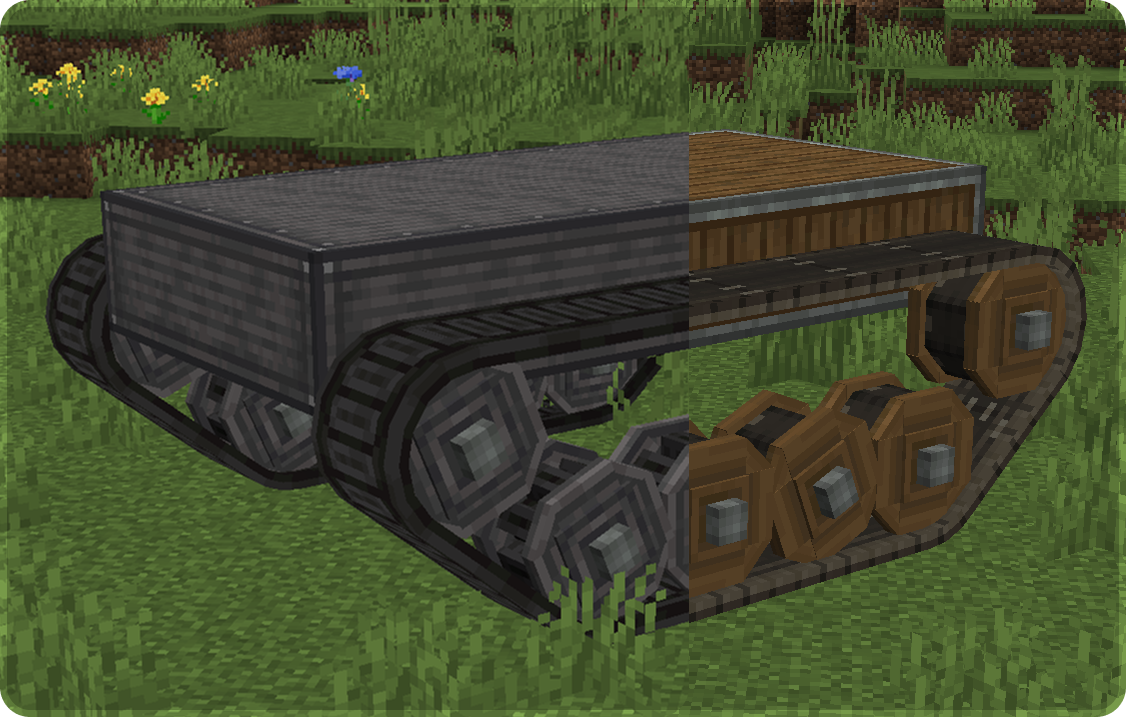
(Note: Create: Bits 'n' Tracks is still in the testing stage; bugs may occur).
Bits ’n’ Tracks
The main tool of the mod is the Cog Alignment Tool. It allows players to adjust cogwheel placement after installation, hide visible cogwheels, reset cogwheel settings, and enable suspension-style physics for supported builds. This makes it easier to line up tracks, tune vehicle movement, and clean up the final look of a build without constantly breaking and replacing blocks.
Main Features
- Track-focused cogwheels in several sizes.
- Industrial cogwheel variants (Models are based on the Industrial Cogwheels from the Create: Gears n' Kinetics mod).
- Hidden cogwheels for cleaner builds.
- Cog Alignment Tool for shifting, hiding, resetting, and tuning cogwheels.
- Suspension-style physics support for tracked vehicles.
- Configurable physics and movement settings.
- Edition: Minecraft Java
- File type: .jar
- Minecraft version listed: 1.21.1
- How to install: Install the matching mod loader (Forge, Fabric or NeoForge) for your Minecraft version. → Download the .jar. → Put it in the .minecraft/mods folder and launch that loader profile.
- Where to get it: Opens on Modrinth — not every file is mirrored on our own servers.
Install steps are the general flow for this file type — How to install Minecraft Java mods & modpacks walks through it step by step.
- Ships as bits_n_tracks-1.0.3.1-release.jar — drop this file into the mods folder
- Download size: 256 KB
- Download link checked 19 Sept 2026 — working
These come from our own check of the pack file, not from the source page.