Bossbar TimerMod
Java mod listed for Minecraft 1.20. Downloads from the MC Java Mods app on Android.
⬇ Download on Modrinth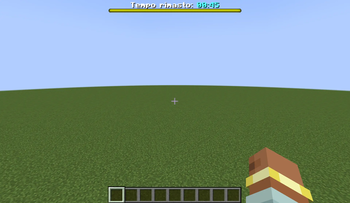
This mod adds a configurable, in-game timer in your bossbar. It includes a config file, called "timer-config.toml", where you can write up to two custom commands to be executed at the end of the timer. The first one can also include a number variable, that you can setup using a custom scoreboard and a fake player (by default #ServerData, but configurable).
To configure the timer, you can use in-game commands:
/timer set ➡️ choose the duration of the timer
/timer start ➡️ start your timer.
/timer add ➡️ add (or remove by adding a - before the number) as many seconds as you want to the timer, also if it's alredy running.
/timer stop ➡️ stop the timer.
/timer get ➡️ get the duration of your timer in chat.
DISCLAIMER: the mod is developed in Italian, so the writing in the bossbar and the config file will be written in Italian.
- Edition: Minecraft Java
- File type: .jar
- Minecraft version listed: 1.20.1
- How to install: Install the matching mod loader (Forge, Fabric or NeoForge) for your Minecraft version. → Download the .jar. → Put it in the .minecraft/mods folder and launch that loader profile.
- Where to get it: Opens on Modrinth — not every file is mirrored on our own servers.
Install steps are the general flow for this file type — How to install Minecraft Java mods & modpacks walks through it step by step.
- Ships as timermod-1.0-forge-1.20.1.jar — drop this file into the mods folder
- Download size: 52 KB
- Download link checked 25 Oct 2026 — working
These come from our own check of the pack file, not from the source page.