
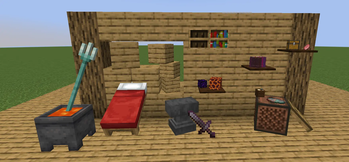
真实置物 (RealPlace)
简介
真实置物允许你把手中的物品直接放进世界,作为可见的放置物来摆放。进入放置模式后,可以对预览物体进行水平旋转、竖直旋转、缩放,并在可用模型之间切换;已经放下的置物也可以重新拾取。
安装了 Jade 时,悬浮查看真实置物会显示对应物品提示。
特性
- 将手持物品放置为世界中的放置物。
- 在放置模式下调整旋转、缩放和模型切换。
- 可拾取已放置的放置物。
- 不会与方块或已有放置物重叠放置。
- 放置物拥有真实碰撞箱。
- 提供可选 Jade 联动悬浮提示。
Overview
RealPlace lets you place the item in your hand directly into the world as a placed object. After entering placement mode, you can rotate the preview horizontally and vertically, scale it, and switch between available models. Objects that have already been placed can also be picked up again.
With Jade installed, hovering over a RealPlace object shows the corresponding item tooltip.
Features
- Place the held item into the world as a placed object.
- Adjust rotation, scale, and model switching in placement mode.
- Pick up objects that have already been placed.
- Prevent placement overlap with blocks or existing placed objects.
- Give placed objects real collision boxes.
- Provide optional compatibility with Jade hover tooltips.
Quick facts
- Edition: Minecraft Java
- File type: .jar
- Minecraft version listed: 1.20.1
- How to install: Install the matching mod loader (Forge, Fabric or NeoForge) for your Minecraft version. → Download the .jar. → Put it in the .minecraft/mods folder and launch that loader profile.
- Where to get it: Opens on Modrinth — not every file is mirrored on our own servers.
Install steps are the general flow for this file type — How to install Minecraft Java mods & modpacks walks through it step by step.
Verified by MCModsHub
- Ships as realplace-1.0.1-1.20.1forge.jar — drop this file into the mods folder
- Download size: 142 KB
- Download link checked 9 Sept 2026 — working
These come from our own check of the pack file, not from the source page.