
Kill Overlay
It shows a custom text when you die or kill someone.It also has a combo with a auto text feature where it will send a customizable message in the chat…
⬇ Download on Modrinth
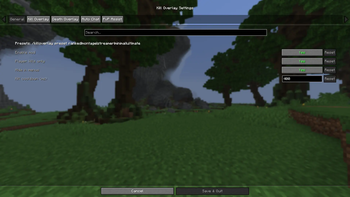
It is a mode that shows a custom text when you die or kill someone. You can customize everything in the UI.You do anything in the UI! There is also a auto chat feature that types in a custom text when you die or kill someone. There is also a section for it in the UI to customize it.But there is more! There is a feature that will calculate your combo in pvp! There is a UI section for it too so you can adjust anything + there are /killoverlay commands.To open the UI you can press the button K on your keyboard for the UI to open. Also note that this mod only works with real players but for the combo to reset, even if you take damage from a mob, it will reset. Cloth config and Fabric Api is required for this mod to run.
- Edition: Minecraft Java
- File type: .jar
- Minecraft versions listed: 26.1, 26.1.1, 26.1.2
- How to install: Install the matching mod loader (Forge, Fabric or NeoForge) for your Minecraft version. → Download the .jar. → Put it in the .minecraft/mods folder and launch that loader profile.
- Where to get it: Opens on Modrinth — not every file is mirrored on our own servers.
Install steps are the general flow for this file type — How to install Minecraft Java mods & modpacks walks through it step by step.
- Ships as killoverlay-1.1.2.jar — drop this file into the mods folder
- Download size: 104 KB
- Download link checked 12 Sept 2026 — working
These come from our own check of the pack file, not from the source page.