
MCSpotify
Java mod listed for Minecraft 1.21. Downloads from the MC Java Mods app on Android.
⬇ Download on Modrinth
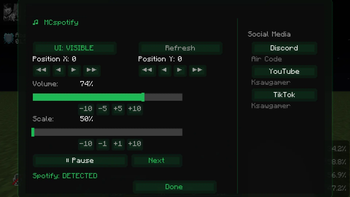
MCSpotify
Bring full Spotify control directly into Minecraft!
MCSpotify is a lightweight and intuitive mod that allows you to control your Spotify playback without leaving the game. Whether you're building, exploring, mining, or fighting mobs, your music is always just a click away.
Features
🎵 HUD Overlay
Display information about the currently playing track directly on your screen.
⏯️ Play & Pause
Control music playback instantly without switching to Spotify or leaving Minecraft.
⏭️ Track Navigation
Skip to the next song or return to the previous one directly from within the game.
🔊 Volume Control
Adjust Spotify volume without minimizing Minecraft.
Supported Version
- Minecraft 1.21.11
Why MCSpotify?
MCSpotify is designed for players who want a seamless music experience while playing Minecraft. The mod integrates Spotify controls directly into the game, allowing you to manage your music without interrupting gameplay.
Stay immersed in your world while keeping complete control over your soundtrack.
Key Benefits
- Simple and easy-to-use interface
- Real-time track information
- In-game Spotify controls
- Lightweight and performance-friendly
- No need to switch between applications
Enjoy your favorite music while playing Minecraft with MCSpotify.
- Edition: Minecraft Java
- File type: .jar
- Minecraft version listed: 1.21.11
- How to install: Install the matching mod loader (Forge, Fabric or NeoForge) for your Minecraft version. → Download the .jar. → Put it in the .minecraft/mods folder and launch that loader profile.
- Where to get it: Opens on Modrinth — not every file is mirrored on our own servers.
Install steps are the general flow for this file type — How to install Minecraft Java mods & modpacks walks through it step by step.
- Ships as mcspotify-1.0.1.jar — drop this file into the mods folder
- Download size: 33 KB
- Download link checked 21 Oct 2026 — working
These come from our own check of the pack file, not from the source page.