
ModsJava
Sleep Progress Bar
Java mod listed for Minecraft 1.21. Downloads from the MC Java Mods app on Android.
⬇ Download on Modrinth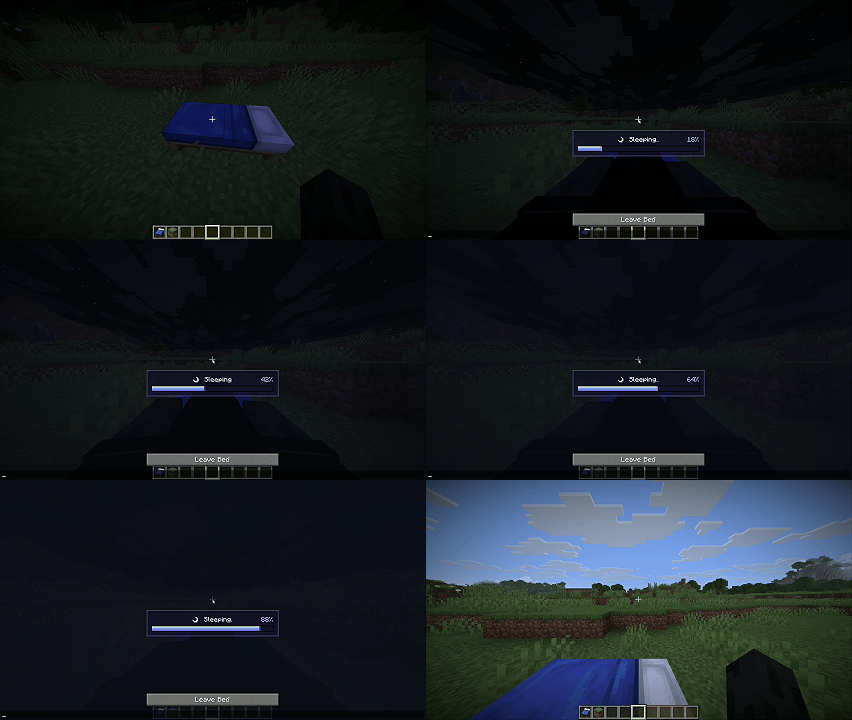
Sleep Progress Bar is a lightweight Fabric client-side mod that makes sleeping feel clearer and more polished. When your player gets into a bed, the mod displays a centered moonlit status panel with a smooth blue-to-purple progress bar, an animated “Sleeping...” label, and a percentage readout so you can see exactly how close the sleep timer is to completion.
Features
- Shows a clean sleep progress bar while the player is in bed.
- Displays the current sleep progress as a percentage.
- Adds a subtle animated glow at the end of the filling bar.
- Uses a compact HUD overlay that only appears while sleeping.
- Purely visual; it does not change Minecraft’s sleep mechanics, time skipping, or multiplayer sleep rules.
Compatibility
- Minecraft: 1.21.11
- Mod loader: Fabric
- Fabric Loader: 0.19.0 or newer
- Java: 21+
- Client-side: Required
- Server-side: Unsupported / not needed
Installation
- Install Fabric Loader for Minecraft 1.21.11.
- Drop
sleep-progress-bar-1.0.0.jarinto yourmodsfolder. - Launch the game and sleep in a bed to see the overlay.
Quick facts
- Edition: Minecraft Java
- File type: .jar
- Minecraft version listed: 1.21.11
- How to install: Install the matching mod loader (Forge, Fabric or NeoForge) for your Minecraft version. → Download the .jar. → Put it in the .minecraft/mods folder and launch that loader profile.
- Where to get it: Opens on Modrinth — not every file is mirrored on our own servers.
Install steps are the general flow for this file type — How to install Minecraft Java mods & modpacks walks through it step by step.
File checked by MCModsHub
- Ships as sleep-progress-bar-1.0.0.jar — drop this file into the mods folder
- Download size: 1.3 MB
- Download link checked 23 Oct 2026 — working
These come from our own check of the pack file, not from the source page.