
ModsJava
Brainrot Pet
Java mod listed for Minecraft 1.21–26.x. File opened and checked on 29 Sep 2026; downloads from the MC Java Mods app on Android.
⬇ Download on Modrinth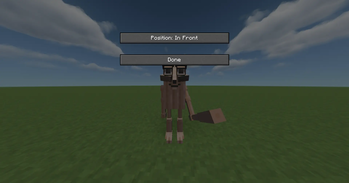
Brainrot Pet
Key Features
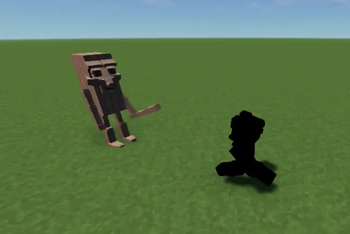
- Dynamic Movement Physics: The pet is fully animated. When you walk, run, or strafe sideways/backward, the pet calculates its own movement direction and dynamically rotates its body to look exactly in the direction it is moving. When you stand still, it smoothly rotates back to face the same way you are looking.
- Vanilla Lighting Integration: Using native Minecraft rendering APIs, the pet is correctly lit depending on the light levels of the blocks and sky around it, blending perfectly into daylight, caves, or torchlit rooms.
- ModMenu Configuration: If you have ModMenu installed, you can access an in-game settings screen to customize your pet.
- Toggle Keybinding: You can easily show or hide your companion at any time. The default toggle key is G, which can be customized in the standard Minecraft controls settings under the "Brainrot Pet" category.
Configuration Settings
You can adjust the following options in-game:
- Follow Position: Choose where your pet stands relative to you. You can set it to follow Behind, in Front, to your Left, or to your Right.
- Visibility: Toggle whether the pet is visible in the world or hidden.
Quick facts
- Edition: Minecraft Java
- File type: .jar
- Minecraft versions listed: 1.21, 1.21.1, 1.21.2
- How to install: Install the matching mod loader (Forge, Fabric or NeoForge) for your Minecraft version. → Download the .jar. → Put it in the .minecraft/mods folder and launch that loader profile.
- Where to get it: Opens on Modrinth — not every file is mirrored on our own servers.
Install steps are the general flow for this file type — How to install Minecraft Java mods & modpacks walks through it step by step.
File checked by MCModsHub
- Ships as 1.21.2.jar — drop this file into the mods folder
- Download size: 1.1 MB
- Download link checked 19 Oct 2026 — working
These come from our own check of the pack file, not from the source page.