
Welcome to GroqCraft
The ultimate AI-powered assistant mod for your Minecraft world! Powered by the ultra-fast Groq API, GroqCraft brings advanced AI directly into your in-game chat — fully asynchronous, lag-free, and context-aware.
Whether you need building advice or emergency survival help while surrounded by mobs, GroqCraft is your intelligent Minecraft companion.
✨ Features
- ⚡ Fast & Lag-Free: Uses the Groq API to generate answers in milliseconds with fully asynchronous requests and zero TPS impact.
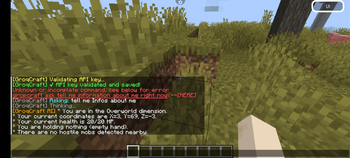
- 🧠 Smart Context Analysis: The AI analyzes your real-time situation including health, dimension, coordinates, held items, and nearby hostile mobs.
- 💬 Conversation Memory: Supports natural follow-up questions and ongoing chat sessions.
- 🛠️ Simple Setup: Easy configuration with quick in-game commands.
🛠️ Commands & Permissions
Main command: /groqcraft
Permission: groqcraft.use
| Command | Description |
|---|---|
/groqcraft help |
Displays the help menu and API instructions. |
/groqcraft api <your_key> |
Saves and validates your Groq API key. |
/groqcraft model |
Select your preferred AI model. |
/groqcraft temperature <0.0 - 1.0> |
Adjust AI creativity and response style. |
/groqcraft ask <your question> |
Chat directly with the AI using live player context. |
🚀 Setup
- Place
GroqCraft.jarinto your minecraftmodsfolder. - Restart or reopen your minecraft.
- Generate a free API key from the Groq Console.
- Run:
/groqcraft api gsk_your_secret_key_here - Configure your model and temperature settings if desired.
💡 Examples
🌋 Survival Help
You ask:
/groqcraft ask What should I do right now?!
GroqCraft responds:
"You are in the Nether with only 2 hearts remaining and multiple hostile mobs nearby. Block line of sight immediately, eat food, and move into cover before engaging."
🏗️ Building & Mechanics
You ask:
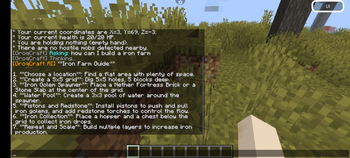
/groqcraft ask How do I build an efficient iron farm?
GroqCraft responds:
Provides a detailed guide with villager mechanics, spawning rules, and optimization tips.
⚙️ Configuration (config.yml)
# GroqCraft Configuration
api-key: "gsk_..."
model: "llama3-8b-8192"
temperature: 0.7

system-prompt: "You are a highly knowledgeable and helpful Minecraft assistant. Analyze player context and provide accurate survival and gameplay advice."
- Edition: Minecraft Java
- File type: .jar
- Minecraft versions listed: 1.21, 1.21.1, 1.21.2
- How to install: Install the matching mod loader (Forge, Fabric or NeoForge) for your Minecraft version. → Download the .jar. → Put it in the .minecraft/mods folder and launch that loader profile.
- Where to get it: Opens on Modrinth — not every file is mirrored on our own servers.
Install steps are the general flow for this file type — How to install Minecraft Java mods & modpacks walks through it step by step.
- Ships as groqcraft-1.0.0 (2).jar — drop this file into the mods folder
- Download size: 23 KB
- Download link checked 10 Sept 2026 — working
These come from our own check of the pack file, not from the source page.