⚡ Saba Speed Indicator
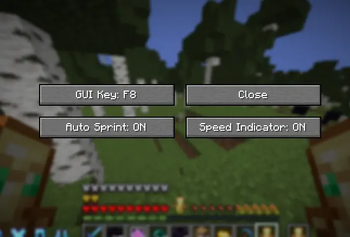
A lightweight and highly customizable utility mod featuring a Speed Indicator and Auto Sprint on Join, all managed through a clean and optimized settings menu.
Designed to be simple, fast, and performance-friendly while giving you the information you need without cluttering your screen.
✨ Features
🏃 Speed Indicator
Monitor your movement speed in real time with a customizable HUD.
📊 Display Modes
- 📝 Text Mode
- 🏎️ Speedometer Mode
🎨 Customization
- 📍 Move the indicator anywhere on your screen
- 📏 Resize the HUD
- 🔢 Toggle decimal precision
- 👁️ Enable or disable it anytime
⚡ Auto Sprint on Join
Automatically enables sprint whenever you join a world or server.
- ✅ One-click toggle
- ⚙️ Fully customizable
- 🚀 Runs automatically in the background
🎨 Optimized Menu
A clean and intuitive configuration menu built for quick access.
- 🖱️ Simple navigation
- ⚡ Fast adjustments
- 🪶 Lightweight design
- 🎯 No unnecessary clutter
📦 Included
- ✅ Speed Indicator
- ✅ Text & Speedometer Display Modes
- ✅ Auto Sprint on Join
- ✅ Fully Customizable HUD
- ✅ Optimized Settings Menu
- ✅ Lightweight & Performance Friendly
🚀 Why Choose Saba Speed Indicator?
- ⚡ Lightweight and optimized
- 🎨 Easy to customize
- 🖥️ Clean modern interface
- 🏃 Perfect for PvP, parkour, speedrunning, and everyday gameplay
- 💨 Built to stay simple without sacrificing useful features
Simple. Fast. Customizable.
Saba Speed Indicator gives you everything you need to monitor your speed and automatically sprint, while keeping your Minecraft experience clean, minimal, and optimized.
- Edition: Minecraft Java
- File type: .jar
- Minecraft versions listed: 1.21.6, 1.21.7, 1.21.8
- How to install: Install the matching mod loader (Forge, Fabric or NeoForge) for your Minecraft version. → Download the .jar. → Put it in the .minecraft/mods folder and launch that loader profile.
- Where to get it: Opens on Modrinth — not every file is mirrored on our own servers.
Install steps are the general flow for this file type — How to install Minecraft Java mods & modpacks walks through it step by step.
- Ships as notamodcom-1.0.0.jar — drop this file into the mods folder
- Download size: 325 KB
- Download link checked 21 Aug 2026 — working
These come from our own check of the pack file, not from the source page.