
ModsJava
Storage Container Labels
Java mod listed for Minecraft 26.x. Downloads from the MC Java Mods app on Android.
⬇ Download on Modrinth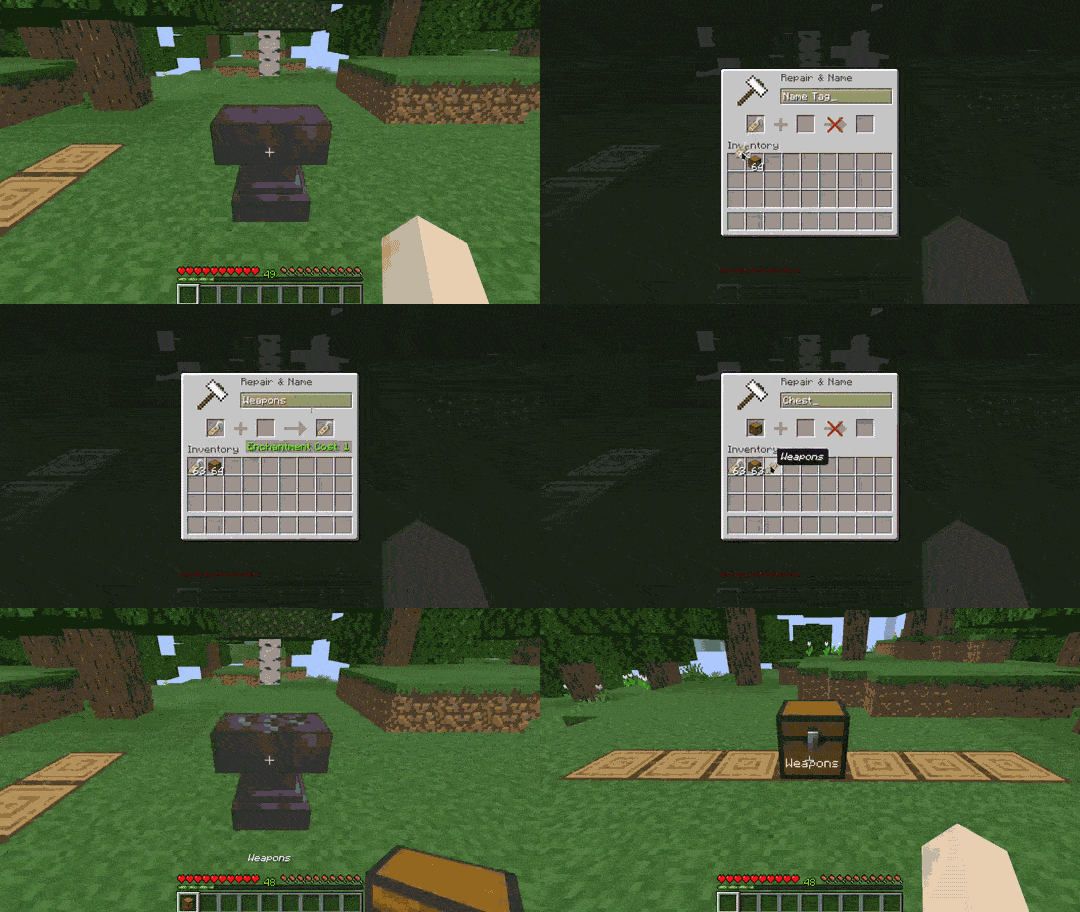
Storage Container Labels
Displays labels above/around named storage containers like chests, barrels, Shulker boxes and more.
Available on Modrinth and CurseForge.
📖 Features
- Works with:
- Single and double chests
- Chest variants
- Barrels
- Shulker boxes
- Hoppers
- Droppers
- Dispensers
- Enable or disable per type
- Configurable render distance, color, size, opacity, offset, fading and visibility
- Option to only show label for the container you're looking at
- Per container text color using
&Xcolor codes (e.g.&cFoodfor red,&cWeapons &f& &2Armorfor mixed colors)
📋 Usage
Naming a container
- Rename a name tag using an anvil.
- Combine the named tag with a container
- Place the container and its name will be displayed as a floating label attached to it.
Configuration
Open the config screen via Mod Menu or by running /storage-container-labels config in chat.
💡 Examples


🔗 Dependencies
Required
Optional
🏷️ Tags
minecraft, mod, fabric, storage, container, chests, names, labels, floating text, quality of life, qol, utility
Quick facts
- Edition: Minecraft Java
- File type: .jar
- Minecraft version listed: 26.2
- How to install: Install the matching mod loader (Forge, Fabric or NeoForge) for your Minecraft version. → Download the .jar. → Put it in the .minecraft/mods folder and launch that loader profile.
- Where to get it: Opens on Modrinth — not every file is mirrored on our own servers.
Install steps are the general flow for this file type — How to install Minecraft Java mods & modpacks walks through it step by step.
File checked by MCModsHub
- Ships as storage-container-labels-1.8.1+26.2.jar — drop this file into the mods folder
- Download size: 36 KB
- Download link checked 19 Oct 2026 — working
These come from our own check of the pack file, not from the source page.