
Player Trade
Java mod listed for Minecraft 1.21. Downloads from the MC Java Mods app on Android.
⬇ Download on Modrinth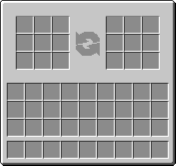
Player Trade adds the function to trade between Player to Player inside Minecraft!
HOW TO USE: Client 1: Use /trade Client 2: Press the accept text in chat, then enter, or type /accept to begin trading.
List of commands and uses:
- /trade (Trade a user)
- /trade on (Enables trading)
- /trade off (Disable trading)
- /accept (Accept a user's trade request)
- /decline (Decline a user's trade request
When done trading, both sides must press accept to register the trade. Then an item will appear in the recipient's inventory or hotbar. Simply right-click to use the item, and the traded loot will appear in their hotbar or inventory
REQUIRES FABRIC API
- Edition: Minecraft Java
- File type: .jar
- Minecraft version listed: 1.21.11
- How to install: Install the matching mod loader (Forge, Fabric or NeoForge) for your Minecraft version. → Download the .jar. → Put it in the .minecraft/mods folder and launch that loader profile.
- Where to get it: Opens on Modrinth — not every file is mirrored on our own servers.
Install steps are the general flow for this file type — How to install Minecraft Java mods & modpacks walks through it step by step.
- Ships as playertrade-1.0.1+1.21.11.jar — drop this file into the mods folder
- Download size: 63 KB
- Download link checked 22 Oct 2026 — working
These come from our own check of the pack file, not from the source page.