
ElytraWEEE
Java mod listed for Minecraft 26.x. Downloads from the MC Java Mods app on Android.
Hold a firework, jump, and fly — your elytra equips itself and you glide instantly. Safe chestplate swap, plus a mid-air fast-swap key for mace PvP.
⬇ Download on Modrinth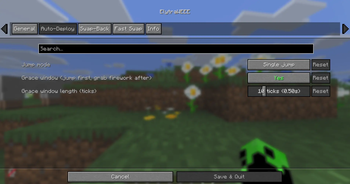
ElytraWEEE
Hold a firework. Jump. Fly. Your elytra equips itself and you start gliding instantly — chestplate swapped out safely, never dropped, and put back on when you land.
Client-only Fabric mod for Minecraft 26.1.2. Works on servers, no server install needed.
Why firework-triggered, not jump-triggered?
Most auto-elytra mods deploy the elytra every time you jump — which wrecks combat: every jump-crit you land on an enemy accidentally throws your elytra on. ElytraWEEE only deploys when you're holding a firework and jump, so your normal combat jumps and jump-crit attacks stay completely untouched. You fly only when you actually mean to.
What it does
- Jump + firework -> instant flight. One jump. You glide right away — no second tap.
- Land -> chestplate comes back. Drop the firework after landing and your chestplate returns automatically.
- Grace window. Jumped a hair too early? Grab the firework within ~0.5s and it still launches.
- Never drops your gear. All swaps are safe. No chestplate? The elytra just goes back where it came from. Inventory full? It stays on.
Fast swap (mace PvP)
One key to flip elytra <-> chestplate instantly — even mid-air. Swap to chestplate, hit, swap back, and you keep gliding automatically (no re-jump). Works even with auto-deploy off.
Keybinds
Under Options -> Controls -> ElytraWEEE (all unbound by default — set your own): Fast swap, Toggle on/off, Open settings.
Settings
Mod Menu -> ElytraWEEE — tabs for General, Auto-Deploy, Swap-Back, Fast Swap, and Info.
The mod only manages an elytra it deployed. Put one on yourself? It leaves your gear alone.
Requirements
- Fabric API
- Cloth Config
- Mod Menu (optional — opens the settings screen)
by dev-limucc · MIT
- Edition: Minecraft Java
- File type: .jar
- Minecraft version listed: 26.2
- How to install: Install the matching mod loader (Forge, Fabric or NeoForge) for your Minecraft version. → Download the .jar. → Put it in the .minecraft/mods folder and launch that loader profile.
- Where to get it: Opens on Modrinth — not every file is mirrored on our own servers.
Install steps are the general flow for this file type — How to install Minecraft Java mods & modpacks walks through it step by step.
- Ships as elytraweee-1.3.0.jar — drop this file into the mods folder
- Download size: 44 KB
- Download link checked 16 Oct 2026 — working
These come from our own check of the pack file, not from the source page.