
creeprchain
Java mod listed for Minecraft 1.20. Downloads from the MC Java Mods app on Android.
⬇ Download on Modrinth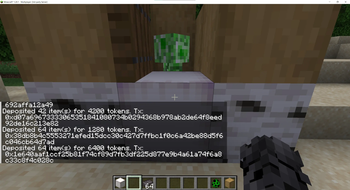
Creeprchain
for installation and building, visit github
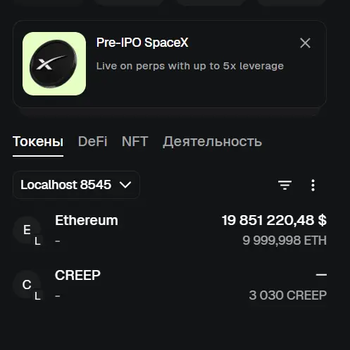
Minecraft Fabric 1.20.1 economy mod. Players deposit items at an ATM block and receive ERC-20-style tokens on an Ethereum-compatible blockchain. Tokens are visible in MetaMask.
Requirements
| Tool | Version |
|---|---|
| Java JDK | 21 |
| Fabric Loader | 0.19.2 |
| Fabric API | 0.92.9+1.20.1 |
| Node.js | 18+ (for Hardhat) |
| Hardhat | installed in blockchain/ |
Building the mod
./gradlew build
The output jar is at:
build/libs/creeprchain-1.0.0.jar
On Windows use
gradlew.bat build
Installing on a Fabric server
- Download Fabric Installer and install Fabric server for Minecraft 1.20.1.
- Copy
build/libs/creeprchain-1.0.0.jarinto the server'smods/folder. - Download Fabric API for 1.20.1 and place it in
mods/as well. - Start the server once — it will create the config directory at
config/creeprchain/. - Edit
config/creeprchain/blockchain.json(see Blockchain setup). - Restart the server.
Installing on a client
- Install Fabric Loader for Minecraft 1.20.1 in the launcher.
- Copy
build/libs/creeprchain-1.0.0.jarinto.minecraft/mods/. - Copy Fabric API for 1.20.1 into
.minecraft/mods/as well. - Launch the game and connect to the server.
The client and server must use the exact same jar. A version mismatch causes registry sync errors (
missing creeprchain:atm_block).
Blockchain setup (tested on LINUX)
The blockchain runs on a separate Linux machine. All commands below are run on that machine inside the blockchain/ folder.
Step 1 — Install dependencies
cd blockchain
npm install
Step 2 — Start Hardhat node
scripts/start-local-chain.sh
This starts a local Ethereum node at 0.0.0.0:8545 (chain ID 31337). Leave this terminal open.
Step 3 — Deploy the contract
Open a second terminal on the same machine:
scripts/deploy-contract.sh
Output example:
Token deployed to: 0xAbCd1234...
Copy the contract address.
Step 4 — Configure blockchain.json
On the Minecraft server machine, edit config/creeprchain/blockchain.json:
{
  "rpcUrl": "http://192.168.0.108:8545",
  "chainId": 31337,
  "contractAddress": "0xAbCd1234...",
  "privateKey": "0xd345b787fa175fa22321746c8e0289ad88eac2de8c39ce67215c8b362af621e5"
}
rpcUrl— IP of the Linux machine running the Hardhat nodecontractAddress— address printed by the deploy scriptprivateKey— the Hardhat deployer account; this wallet signs mint/burn transactions on behalf of the server
Restart the Minecraft server. The log will show:
BlockchainService connected: rpc=http://192.168.0.108:8545 chainId=31337 contract=0x...
MetaMask setup
- Open MetaMask → Settings → Networks → Add network manually:
- RPC URL:
http://192.168.0.108:8545 - Chain ID:
31337 - Currency symbol: ETH
- RPC URL:
- Add the token: MetaMask → Tokens → Import token → paste the contract address.
- Note your MetaMask wallet address — you will use it with
/linkwallet.
In-game setup and test
/linkwallet 0xYourMetaMaskAddress
Place an ATM block (/give @p creeprchain:atm_block) and right-click it while holding a diamond (or another configured item). The tokens will appear in MetaMask.
Commands
| Command | Description |
|---|---|
/linkwallet <address> |
Bind your Minecraft account to an Ethereum wallet address |
/balance |
Show your token balance |
/send <player> <amount> |
Transfer tokens to another online player |
/withdraw <amount> |
Burn tokens (blockchain withdraw) |
/withdraw <item> <count> |
Burn tokens and receive Minecraft items |
Configuration
Config files live in config/creeprchain/ on the server. If absent, bundled defaults from src/main/resources/config/ are used.
economy.json — deposit and withdraw rates
{
  "depositRates": {
    "minecraft:diamond": 100,
    "minecraft:iron_ingot": 10,
    "minecraft:gold_ingot": 20
  },
  "withdrawRates": {
    "minecraft:diamond": 95,
    "minecraft:iron_ingot": 9,
    "minecraft:gold_ingot": 18
  },
  "maxDeposit": 10000,
  "maxWithdraw": 5000,
  "maxBalance": 100000
}
blockchain.json — connection to the Ethereum node
{
  "rpcUrl": "http://192.168.0.108:8545",
  "chainId": 31337,
  "contractAddress": "0x0000000000000000000000000000000000000000",
  "privateKey": ""
}
If privateKey is empty or contractAddress is zero, the mod runs in local-ledger mode (transactions stored only in SQLite, no blockchain interaction).
License
MIT
- Edition: Minecraft Java
- File type: .jar
- Minecraft versions listed: 1.20.1, 1.20.2, 1.20.3
- How to install: Install the matching mod loader (Forge, Fabric or NeoForge) for your Minecraft version. → Download the .jar. → Put it in the .minecraft/mods folder and launch that loader profile.
- Where to get it: Opens on Modrinth — not every file is mirrored on our own servers.
Install steps are the general flow for this file type — How to install Minecraft Java mods & modpacks walks through it step by step.
- Ships as creeprchain-1.0.0.jar — drop this file into the mods folder
- Download size: 27.0 MB
- Download link checked 4 Oct 2026 — working
These come from our own check of the pack file, not from the source page.