
Ferium
Java mod listed for Minecraft 26.x. Downloads from the MC Java Mods app on Android.
⬇ Download on Modrinth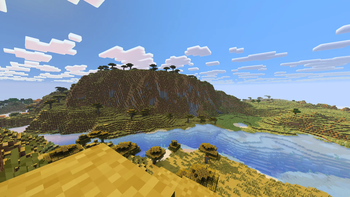
🌌 Ferium
⚠️ WARNING: This project is in deep pre-alpha stage! The mod is currently very raw. Frequent bugs, crashes, performance issues, or incompatibility with other mods may occur. Use it at your own risk! In the future, the project will most likely be completely restructured into something much larger than what it is now.
🔴 CRITICAL REQUIREMENT: This mod MUST be run with the Vulkan API enabled. If you run the mod without Vulkan, you will experience severe lag and your FPS will drop to 0!
Ferium is an experimental graphics mod for Minecraft (Fabric) designed to improve the visual and technical parts of the game, with a focus on modern graphics APIs and native integration.
🚀 What does the mod do right now?
🐧 1. Native Wayland Integration for Linux
If you play on Linux under Wayland, you have probably encountered Minecraft starting through XWayland (X11 compatibility layer), which can cause input lag, scaling issues, or screen tearing.
- What Ferium does: The mod forces GLFW to initialize a native Wayland window. This provides smooth mouse input, correct scaling, and better performance on modern Linux distributions.
- Note: For Windows and macOS users, this feature is automatically disabled safely without breaking the game's startup.
🎨 2. Built-in Shaders (Inspired by Vibrant Visuals)
Since the original Vibrant Visuals shader (known from Bedrock Edition) is not yet available on Java Edition, this mod attempts to recreate and approximate this unique warm and saturated aesthetic on Java:
- Volumetric Clouds: High-quality fullscreen cloud raymarching with soft lighting.
- Shadows and Warm Light: Dynamic cascaded shadow maps with soft filtering (PCF).
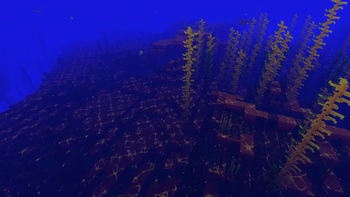
- Improved Water Caustics: Thin, detailed, and aesthetically refracting yellowish patterns of light underwater.
- Edition: Minecraft Java
- File type: .jar
- Minecraft version listed: 26.2
- How to install: Install the matching mod loader (Forge, Fabric or NeoForge) for your Minecraft version. → Download the .jar. → Put it in the .minecraft/mods folder and launch that loader profile.
- Where to get it: Opens on Modrinth — not every file is mirrored on our own servers.
Install steps are the general flow for this file type — How to install Minecraft Java mods & modpacks walks through it step by step.
- Ships as ferium-0.0.2-alpha.jar — drop this file into the mods folder
- Download size: 339 KB
- Download link checked 12 Oct 2026 — working
These come from our own check of the pack file, not from the source page.