
Overview
This is a utility mod designed for map makers and modpack authors.
It provides modpack creators with a low‑threshold way to manipulate item tooltip content.
Features
The mod has three operation modes:
- Replace (corresponding
replacefolder): Clears the original tooltip and writes custom text. - Append (corresponding
appendfolder): Adds text starting from the line directly below the original tooltip. - Extra (corresponding
extrafolder): Shows extra text when holding Shift.
All three modes can work simultaneously, applied in the order: Replace → Append → Extra.
How to Use
The mod is extremely easy to use – you only need a basic understanding of JSON format and Minecraft registry names.
Simply write a JSON file, place it in the folder corresponding to the mod ID and the desired mode. The JSON file name does not matter; the mod will read all JSON files under the correct path.
Supports \n for line breaks and vanilla control characters.
<modpack root>
└─simple_tooltips/
    ├── modid/
    │   ├── replace/
    │   │       └── XXX.json
    │   ├── append/
    │   │       └── XXX.json
    │   └── extra/
    │            └── XXX.json
......
Configuration Example
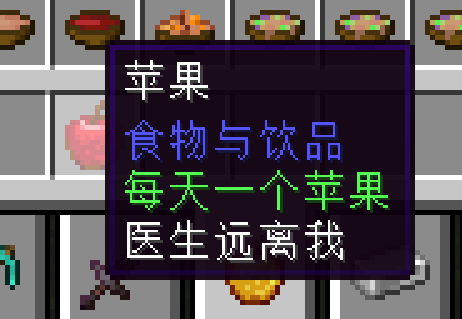
Example using Replace mode + apple:
<modpack root>\simple_tooltips\minecraft\append\apple.json
{
  "apple": "§aAn apple a day\nkeeps the doctor away"
}
- Edition: Minecraft Java
- File type: .jar
- Minecraft versions listed: 1.21, 1.21.1, 1.21.2
- How to install: Install the matching mod loader (Forge, Fabric or NeoForge) for your Minecraft version. → Download the .jar. → Put it in the .minecraft/mods folder and launch that loader profile.
- Where to get it: Opens on Modrinth — not every file is mirrored on our own servers.
Install steps are the general flow for this file type — How to install Minecraft Java mods & modpacks walks through it step by step.
- Ships as misia_s_simple_tooltips-1.0.0.jar — drop this file into the mods folder
- Download size: 10 KB
- Download link checked 11 Sept 2026 — working
These come from our own check of the pack file, not from the source page.