
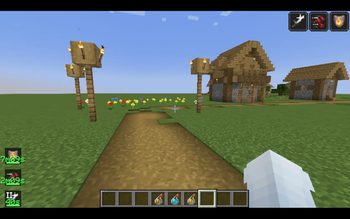
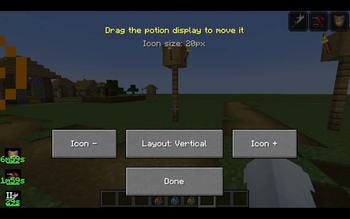
PotionTimer overlays countdown timers and progress bars directly on your potion effect icons — always know exactly when to repot, no guessing.
Features
- Vanilla potion sprites — every effect is instantly recognisable
- Countdown timer per effect — green when safe, yellow when fading, red when almost gone (thresholds configurable)
- Draining progress bar at the bottom of each icon
- Two icon styles: Default (colored panel matching potion color) and Transparent (minimal, just the icon)
- Roman numeral level indicator for amplified effects (Speed II, Strength III etc)
- Infinite effect support — shows ∞ instead of a timer
- Hide the vanilla top-right effect list so only PotionTimer shows
- Horizontal or vertical layout
- Icon size, padding, scale, background opacity — all adjustable
- Position saves automatically on drag release
Controls
,— open config screen.— open drag/move screen- Both configurable in Options → Controls under PotionTimer
Requirements
- Fabric Loader 0.16+
- Fabric API
- Minecraft 1.21
Designed with Steam Deck in mind — large touch-friendly icons and buttons, drag-to-move works with touch input.
Quick facts
- Edition: Minecraft Java
- File type: .jar
- Minecraft version listed: 1.21
- How to install: Install the matching mod loader (Forge, Fabric or NeoForge) for your Minecraft version. → Download the .jar. → Put it in the .minecraft/mods folder and launch that loader profile.
- Where to get it: Opens on Modrinth — not every file is mirrored on our own servers.
Install steps are the general flow for this file type — How to install Minecraft Java mods & modpacks walks through it step by step.
Verified by MCModsHub
- Ships as potiontimer-1.0.2.jar — drop this file into the mods folder
- Download size: 19 KB
- Download link checked 12 Sept 2026 — working
These come from our own check of the pack file, not from the source page.