
ModsJava
SmartChat Macros
I don't know my version or loader
Open the Minecraft launcher and look at the profile you play on — it names both, like fabric-loader-1.21.4. The version also shows in the bottom-right corner of the game's main menu.
No loader in the profile name? Then it's plain Minecraft, and these mods won't run — you need Fabric or NeoForge installed first.
SmartChat
A lightweight chat macro panel — always one click away.
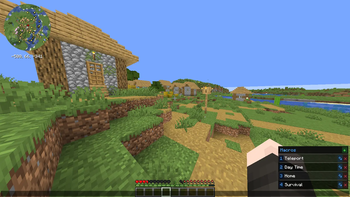
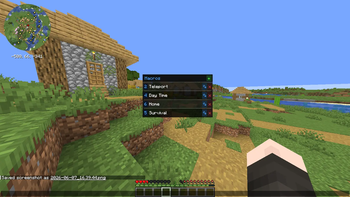
Tired of retyping the same commands and messages? SmartChat adds a sleek side panel directly to your chat screen, giving you instant access to all your macros without opening any extra menus.
Features
- Macro panel in chat — open chat and your macros are right there, no extra screen needed
- Click to fire — click any macro to send it instantly and close chat
- Keybind slots — assign macros to 9 keybind slots and fire them without even opening chat
- Per-server macros — separate macro lists for each server and singleplayer
- Inline editing — add, rename, and delete macros directly in the panel
- Command support — macros starting with / are sent as commands automatically
- Draggable panel — reposition it anywhere on screen
- Shared across profiles — macros persist across different mod profiles and launchers
How to Use
- Open chat — the macro panel appears on the right side of the screen
- Click + to add a macro, give it a name and a message
- Click a macro to fimber and use thekeybind
Client-side only — works on any server, no server-side installation needed.
Quick facts
- Edition: Minecraft Java
- File type: .jar
- Minecraft versions listed: 1.21, 1.21.1, 1.21.2
- How to install: Install the matching mod loader (Forge, Fabric or NeoForge) for your Minecraft version. → Download the .jar. → Put it in the .minecraft/mods folder and launch that loader profile.
- Where to get it: Opens on Modrinth — not every file is mirrored on our own servers.
Install steps are the general flow for this file type — How to install Minecraft Java mods & modpacks walks through it step by step.
Verified by MCModsHub
- Ships as smartchat-1.0.0-mc1.21.x.jar — drop this file into the mods folder
- Download size: 102 KB
- Download link checked 8 Sept 2026 — working
These come from our own check of the pack file, not from the source page.