BuildStreak
Java mod listed for Minecraft 1.21. Downloads from the MC Java Mods app on Android.
Tiny top-left HUD that counts how many blocks you placed this session, split by Wood / Stone / Dirt / Other, with a live blocks-per-minute pace. Toggle B…
⬇ Download on Modrinth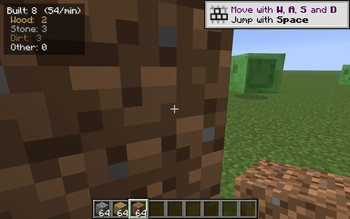
BuildStreak is a one-purpose HUD that gives you a glanceable answer to how much have I actually built this session? It sits quietly in the top-left corner and ticks up every time you place a block — with a per-category breakdown and a rolling blocks-per-minute pace so you can see whether you have been on a real building grind or just placing the occasional torch.
It is the placement-side companion to mining-counter mods: where those track what you have torn down, BuildStreak tracks what you have put up.
What it shows
Built: 137  (74/min)
 Wood:  42
 Stone: 68
 Dirt:  21
 Other: 6
- Built — total blocks placed since the last reset.
- (N/min) — blocks per minute since your first placement this session.
- Wood — logs, planks, woods, stems and hyphae of every tree type.
- Stone — stone, cobblestone, deepslate, granite/diorite/andesite, basalt, blackstone, tuff, netherrack, end stone, calcite, dripstone, quartz, brick variants and their polished/cobbled siblings.
- Dirt — dirt, grass block, coarse/rooted dirt, podzol, mycelium, mud, sand, gravel, snow block, dirt path, farmland.
- Other — everything else (glass, wool, terracotta, decorative blocks, redstone, ...).
Controls
- B — toggle the HUD on / off.
- Shift + B — reset all counters to zero (and restart the pace clock).
Both keys use raw GLFW polling so they work on every supported Minecraft version with no rebind UI needed.
Compatibility
Works on Minecraft 1.21.8, 1.21.9, 1.21.10, and 1.21.11 (Fabric Loader 0.16+). One JAR for all four versions — install via Fabric and drop into your mods/ folder.
- Pure client-side — install on the client only, works on any server, no game-state changes.
- Hides automatically when you press F1 to hide the rest of the HUD.
- Counters live in memory only — they reset when you quit the game (intentionally; this is a session streak, not a lifetime stat).
Why
Most building stats either live in advancements or in a screen you have to open. BuildStreak just gives you a real-time pulse on what you have been laying down — handy for timed building challenges, megabase progress checks, or just satisfying numbers while you grind.
- Edition: Minecraft Java
- File type: .jar
- Minecraft versions listed: 1.21.8, 1.21.9, 1.21.10
- How to install: Install the matching mod loader (Forge, Fabric or NeoForge) for your Minecraft version. → Download the .jar. → Put it in the .minecraft/mods folder and launch that loader profile.
- Where to get it: Opens on Modrinth — not every file is mirrored on our own servers.
Install steps are the general flow for this file type — How to install Minecraft Java mods & modpacks walks through it step by step.
- Ships as buildstreak-1.0.0.jar — drop this file into the mods folder
- Download size: 11 KB
- Download link checked 4 Oct 2026 — working
These come from our own check of the pack file, not from the source page.