BowCharge
Centered HUD bar showing the exact draw % of your bow and charge % of a crossbow, with a red-yellow-green gradient and a clear DRAWN!/LOADED! cue at full…
⬇ Download on Modrinth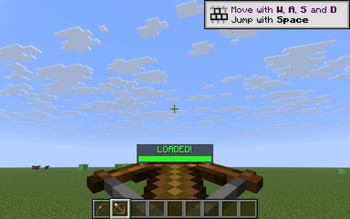
BowCharge answers a question vanilla never quite does: "is my bow ready yet?" When you start drawing a bow — or charging a crossbow — a thin progress bar fades in above your hotbar showing the exact charge percentage. A red->yellow->green gradient tracks the pull, and the moment you hit full draw the bar locks green and the label flips to DRAWN! (or LOADED! for crossbows). Release; bar disappears. No fluff, no config screens, just the one number you actually want to see while aiming.
What it shows
While drawing a bow the bar shows Draw: 73%; at full draw it locks green and reads DRAWN!. For a crossbow being cranked it shows Load: 60%, flipping to LOADED! when it locks in.
How it works
- Bow draw progress uses vanilla's own pull curve
(t^2 + 2t) / 3, so the bar lines up exactly with when your shot becomes a power-3 arrow. - Crossbow progress is a straight 25-tick charge (the vanilla unenchanted load time).
- The HUD is drawn through Fabric's
HudRenderCallback, so it respects F1 (hide HUD) automatically and never overlaps the hotbar. - Everything is read-only — no mixins, no input interception, no movement changes. Drop it on any server.
Controls
- B — toggle the bar on / off (default: on)
The key is read via raw GLFW polling so it works identically on every supported Minecraft version without a separate rebind screen.
Compatibility
Works on Minecraft 1.21.8, 1.21.9, 1.21.10, and 1.21.11 (Fabric Loader 0.16+). One JAR for all four versions — install with Fabric API and drop into your mods/ folder.
- Pure client-side — install on the client only, works on any server, no anti-cheat impact.
- Hides automatically when you press F1 to hide the rest of the HUD.
- Zero config files; nothing to set up.
Why
Vanilla gives you a hand-animation hint that the bow is drawn, but no precise feedback — and crossbows give you almost nothing until the click. BowCharge turns "feel" into a number you can read at a glance, which matters in PvP, long-shot archery, and anywhere you want to time a max-power release.
- Edition: Minecraft Java
- File type: .jar
- Minecraft versions listed: 1.21.8, 1.21.9, 1.21.10
- How to install: Install the matching mod loader (Forge, Fabric or NeoForge) for your Minecraft version. → Download the .jar. → Put it in the .minecraft/mods folder and launch that loader profile.
- Where to get it: Opens on Modrinth — not every file is mirrored on our own servers.
Install steps are the general flow for this file type — How to install Minecraft Java mods & modpacks walks through it step by step.
- Ships as bowcharge-1.0.0.jar — drop this file into the mods folder
- Download size: 7 KB
- Download link checked 6 Sept 2026 — working
These come from our own check of the pack file, not from the source page.