
Block Target Info
Java mod listed for Minecraft 1.21. Downloads from the MC Java Mods app on Android.
A tiny always-on HUD that reads the block under your crosshair: name, hardness, the right tool, and the light level.
⬇ Download on Modrinth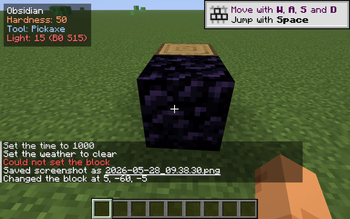
Block Target Info
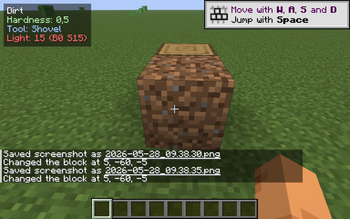
A small, always-on HUD overlay that tells you what you're looking at. Aim at any solid block and a tidy 4-line readout appears in the corner:
- Block name — the same name F3 would show, in clean English (e.g. "Oak Log", "Diamond Ore", "Obsidian").
- Hardness — how long it takes to mine, colour-coded so you can tell a 0.5-hardness shrub from a 50-hardness obsidian block at a glance.
- Tool — pickaxe / axe / shovel / hoe / hand, so you don't have to remember which tool drops what.
- Light level — the light on the face you're aiming at, with separate block-light and sky-light readouts (B / S). Goes amber under 8, red at 0, so you can spot spawnable surfaces while you build.
Pure client-side, drop-in, works on any server. No mixins, no gameplay changes.
Why?
F3 is huge and ugly and floods your screen with debug info. Other HUD mods focus on coordinates or biomes. This one does one thing: tells you about the block you're pointing at. Useful while building, mining, or just learning the game.
Controls & config
- Default toggle key: B. Press at any time to show/hide the readout.
- Config file:
<minecraft>/config/blocktarget.json. Choose the corner, which lines to show, the toggle key, and the max distance.
Compatibility
- Minecraft: 1.21.8 – 1.21.10 (single JAR).
- Loader: Fabric.
- Side: client-only — no need to install on the server.
Credits
Original mod, MIT licence. Issues / PRs welcome.
- Edition: Minecraft Java
- File type: .jar
- Minecraft versions listed: 1.21.8, 1.21.9, 1.21.10
- How to install: Install the matching mod loader (Forge, Fabric or NeoForge) for your Minecraft version. → Download the .jar. → Put it in the .minecraft/mods folder and launch that loader profile.
- Where to get it: Opens on Modrinth — not every file is mirrored on our own servers.
Install steps are the general flow for this file type — How to install Minecraft Java mods & modpacks walks through it step by step.
- Ships as blocktarget-1.0.0.jar — drop this file into the mods folder
- Download size: 17 KB
- Download link checked 4 Oct 2026 — working
These come from our own check of the pack file, not from the source page.