
Minecraft maps.
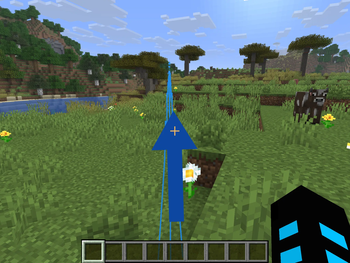
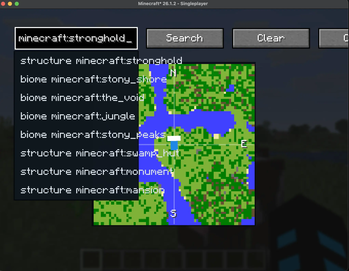
Minecraft mapsadds a navigation-style map UI to Minecraft Java Edition. Open the map, search for a structure, and follow an on-screen direction arrow with distance prompts to help guide you through the world.
Search examples:
minecraft:stronghold
minecraft:village_plains
minecraft:ancient_city
minecraft:mineshaft
minecraft:desert_pyramid
Features
Search for Minecraft structures by ID
Google Maps-style direction arrow
Distance and turn prompts while travelling
In-game map UI with a search box at the top
Nearby terrain display based on loaded chunks
Player markers on the map
Target marker for your selected destination
Singleplayer support
Multiplayer support when installed on both client and server
Map UI
Press G to open the navigation map.
The map screen includes:
Search box for structure IDs
Search, Clear, and Close buttons
Nearby terrain map
Player markers
Destination marker
Direction labels for north, south, east, and west
After searching for a structure, the mod shows a target marker on the map and a rotating HUD arrow while you travel.
Operator Features
Server operators can control their visibility on the map.
/gmaps hide
Hides you from all map player markers, including maps viewed by other operators.
/gmaps show
Makes you visible on the map again.
/gmaps togglehide
Toggles between hidden and visible.
Operators can also click visible player markers on the map to teleport directly to that player. Hidden players cannot be teleported to from the map.
Multiplayer
For multiplayer servers, this mod must be installed on both the client and the server.
The server handles:
Structure searching
Operator permission checks
Hidden player syncing
Map teleport validation
This keeps operator tools secure and prevents client-side abuse.
Requirements
Minecraft Java Edition 26.1.2
Fabric Loader 0.19.2 or newer
Fabric API
Java 25 or newer
Notes
The terrain map displays nearby loaded terrain around the player. It is not an infinite world map, and unexplored/unloaded areas may not appear until chunks are loaded.
Structure search depends on Minecraft’s generated structure data and may take a moment depending on the world and server.
- Edition: Minecraft Java
- File type: .jar
- Minecraft version listed: 26.1.2
- How to install: Install the matching mod loader (Forge, Fabric or NeoForge) for your Minecraft version. → Download the .jar. → Put it in the .minecraft/mods folder and launch that loader profile.
- Where to get it: Opens on Modrinth — not every file is mirrored on our own servers.
Install steps are the general flow for this file type — How to install Minecraft Java mods & modpacks walks through it step by step.
- Ships as Arca1n Maps-0.1.0.jar — drop this file into the mods folder
- Download size: 50 KB
- Download link checked 13 Sept 2026 — working
These come from our own check of the pack file, not from the source page.